

review tool scans the PR code changes, and generates feedback about the PR to aid the review process.
Note that the main purpose of the review tool is to provide the PR reviewer with useful feedback and insights. The PR author may prefer to focus on the output of the improve tool, which provides actionable code suggestions.
Example usage
Manual triggering
Run the tool manually by commenting/review on any PR:

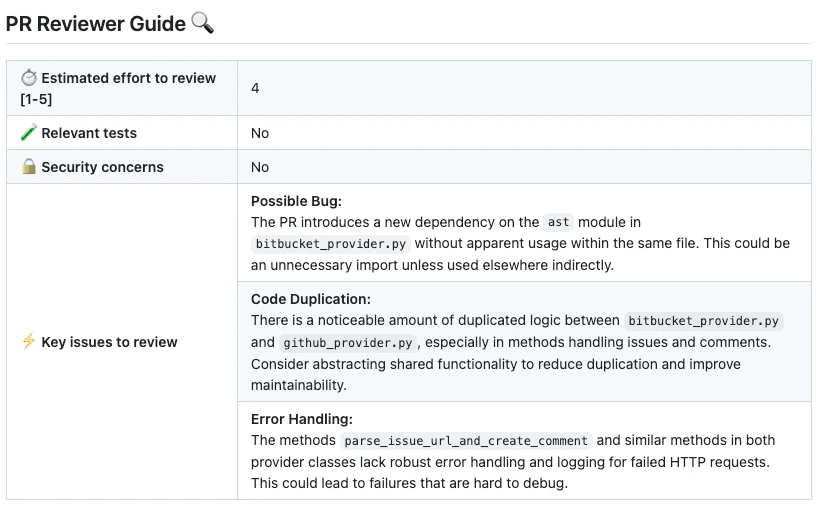
How to use the review tool
Manual usage
Comment on the PR:
Learn more about automatic usage of tools.
review tool is:
review tool will run automatically on every PR, without any additional configurations. Edit this field to enable/disable the tool, or to change the configurations used.
Configuration options
Configuration options table
Configure thereview tool by setting configurations under the pr_reviewer part in your configuration file.
General options
Enable\disable specific sub-sections
Adding PR labels
You can enable thereview tool to add specific labels to the PR:
Extra instructions
Extra instructions are important. Thereview tool can be configured with extra instructions, which can be used to guide Qodo to a feedback tailored to the needs of your project.
Be specific, clear, and concise in the instructions. With extra instructions, you are the prompter. Specify the relevant sub-tool, and the relevant aspects of the PR that you want to emphasize.
Examples of extra instructions:
Labels
Thereview tool can auto-generate two specific types of labels for a PR:
- A
possible security issuelabel that detects if a possible security issue exists in the PR code (enable_review_labels_securityflag) - A
Review effort [1-5]: xlabel, where x is the estimated effort to review the PR (enable_review_labels_effortflag)