> ## Documentation Index
> Fetch the complete documentation index at: https://docs.qodo.ai/llms.txt
> Use this file to discover all available pages before exploring further.
# Review
GitHub
GitLab
Bitbucket
**Git Integration (formerly Qodo Merge)** – AI code review agents for pull requests. This documentation describes the Qodo v1 experience. For the Qodo v2 documentation, click [here.](/code-review)
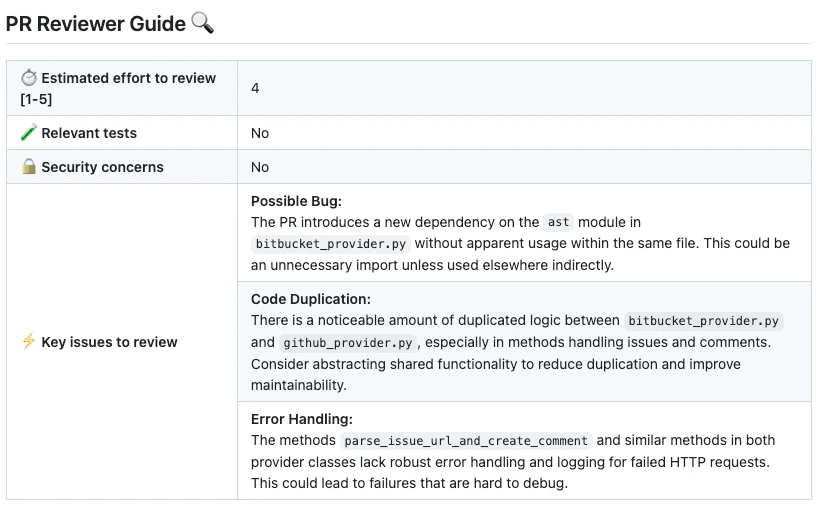
The `review` tool scans the PR code changes, and generates feedback about the PR to aid the review process.
Note that the main purpose of the `review` tool is to provide the **PR reviewer** with useful feedback and insights. The **PR author** may prefer to focus on the output of the [`improve` tool](/v1/tools/tools-list/improve), which provides actionable code suggestions.
## Example usage
### Manual triggering
Run the tool manually by commenting `/review` on any PR:
 The tool will generate a review for the PR:
 ## How to use the `review` tool
**Manual usage**
Comment on the PR:
```bash theme={null}
/review
```
You can also add configuration flags to the command to customize behavior:
```bash theme={null}
/review --pr_reviewer.some_config1=... --pr_reviewer.some_config2=...
```
**Automatic usage**
To run the tool automatically when a PR is opened, add it to your [configuration file](/v1/configuration/configuration-file/):
```bash theme={null}
[github_app]
pr_commands = [
"/review",
...
]
[pr_reviewer] # Edit this field to enable/disable the tool, or to change the configurations used.
extra_instructions = "..."
...
```
When you first install Qodo app, the [default mode](https://qodo-merge-docs.qodo.ai/usage-guide/automations_and_usage/#github-app-automatic-tools-when-a-new-pr-is-opened) for the `review` tool is:
```bash theme={null}
pr_commands = ["/review", ...]
```
Meaning the `review` tool will run automatically on every PR, without any additional configurations. Edit this field to enable/disable the tool, or to change the configurations used.
## Configuration options
### Configuration options table
Configure the `review` tool by setting configurations under the `pr_reviewer` part in your [configuration file](/v1/configuration/configuration-file/).
#### General options
| Possible configurations | Default value | What they do |
| :---------------------- | :------------ | :--------------------------------------------------------------------------------------------------------------------------------------- |
| `persistent_comment` | `true` | If set to true, the review comment will be persistent, meaning that every new review request will edit the previous one. |
| `final_update_message` | `true` | If set to true, updating a persistent review comment will automatically add a short comment to the PR with a link to the updated review. |
| `extra_instructions` | none | Optional extra instructions for the tool. For example: "focus on the changes in the file X", "Ignore changes in ..." |
| `enable_help_text` | `true` | If set to true, Qodo will display a help text in the comment. |
#### Enable\disable specific sub-sections
| Possible configurations | Default value | What they do |
| :---------------------------------- | :------------ | :------------------------------------------------------------------------------------------------------------------------------------------------- |
| `require_score_review` | `false` | If set to true, Qodo will add a section that scores the PR. |
| `require_tests_review` | `true` | If set to true, Qodo will add a section that checks if the PR contains tests. |
| `require_estimate_effort_to_review` | `true` | If set to true, Qodo will add a section that estimates the effort needed to review the PR. |
| `require_can_be_split_review` | `false` | If set to true, Qodo will add a section that checks if the PR contains several themes, and can be split into smaller PRs. |
| `require_security_review` | `true` | If set to true, Qodo will add a section that checks if the PR contains a possible security or vulnerability issue. |
| `require_ticket_analysis_review` | `true` | If set to true, and the PR contains a GitHub or Jira ticket link, Qodo will add a section that checks if the PR fulfilled the ticket requirements. |
#### Adding PR labels
You can enable the `review` tool to add specific labels to the PR:
| Possible configurations | Default value | What they do |
| :------------------------------ | :------------ | :-------------------------------------------------------------------------------------------------- |
| `enable_review_labels_security` | `true` | If set to true, Qodo will publish a `possible security issue` label if it detects a security issue. |
| `enable_review_labels_effort` | `true` | If set to true, Qodo will publish a `Review effort` label, with a score from 1 to 5. |
### Extra instructions
Extra instructions are important. The `review` tool can be configured with extra instructions, which can be used to guide Qodo to a feedback tailored to the needs of your project.
Be specific, clear, and concise in the instructions. With extra instructions, you are the prompter. Specify the relevant sub-tool, and the relevant aspects of the PR that you want to emphasize.
Examples of extra instructions:
```bash theme={null}
[pr_reviewer]
extra_instructions="""\
In the code feedback section, emphasize the following:
- Does the code logic cover relevant edge cases?
- Is the code logic clear and easy to understand?
- Is the code logic efficient?
...
"""
```
Use **triple quotes** to write multi-line instructions.
### Labels
The `review` tool can auto-generate two specific types of labels for a PR:
* A `possible security issue` label that detects if a possible [security issue](https://github.com/Codium-ai/pr-agent/blob/tr/user_description/pr_agent/settings/pr_reviewer_prompts.toml#L136) exists in the PR code (`enable_review_labels_security` flag)
* A `Review effort [1-5]: x` label, where x is the estimated effort to review the PR (`enable_review_labels_effort` flag)
Both modes are useful, and we recommended to enable them.
## How to use the `review` tool
**Manual usage**
Comment on the PR:
```bash theme={null}
/review
```
You can also add configuration flags to the command to customize behavior:
```bash theme={null}
/review --pr_reviewer.some_config1=... --pr_reviewer.some_config2=...
```
**Automatic usage**
To run the tool automatically when a PR is opened, add it to your [configuration file](/v1/configuration/configuration-file/):
```bash theme={null}
[github_app]
pr_commands = [
"/review",
...
]
[pr_reviewer] # Edit this field to enable/disable the tool, or to change the configurations used.
extra_instructions = "..."
...
```
When you first install Qodo app, the [default mode](https://qodo-merge-docs.qodo.ai/usage-guide/automations_and_usage/#github-app-automatic-tools-when-a-new-pr-is-opened) for the `review` tool is:
```bash theme={null}
pr_commands = ["/review", ...]
```
Meaning the `review` tool will run automatically on every PR, without any additional configurations. Edit this field to enable/disable the tool, or to change the configurations used.
## Configuration options
### Configuration options table
Configure the `review` tool by setting configurations under the `pr_reviewer` part in your [configuration file](/v1/configuration/configuration-file/).
#### General options
| Possible configurations | Default value | What they do |
| :---------------------- | :------------ | :--------------------------------------------------------------------------------------------------------------------------------------- |
| `persistent_comment` | `true` | If set to true, the review comment will be persistent, meaning that every new review request will edit the previous one. |
| `final_update_message` | `true` | If set to true, updating a persistent review comment will automatically add a short comment to the PR with a link to the updated review. |
| `extra_instructions` | none | Optional extra instructions for the tool. For example: "focus on the changes in the file X", "Ignore changes in ..." |
| `enable_help_text` | `true` | If set to true, Qodo will display a help text in the comment. |
#### Enable\disable specific sub-sections
| Possible configurations | Default value | What they do |
| :---------------------------------- | :------------ | :------------------------------------------------------------------------------------------------------------------------------------------------- |
| `require_score_review` | `false` | If set to true, Qodo will add a section that scores the PR. |
| `require_tests_review` | `true` | If set to true, Qodo will add a section that checks if the PR contains tests. |
| `require_estimate_effort_to_review` | `true` | If set to true, Qodo will add a section that estimates the effort needed to review the PR. |
| `require_can_be_split_review` | `false` | If set to true, Qodo will add a section that checks if the PR contains several themes, and can be split into smaller PRs. |
| `require_security_review` | `true` | If set to true, Qodo will add a section that checks if the PR contains a possible security or vulnerability issue. |
| `require_ticket_analysis_review` | `true` | If set to true, and the PR contains a GitHub or Jira ticket link, Qodo will add a section that checks if the PR fulfilled the ticket requirements. |
#### Adding PR labels
You can enable the `review` tool to add specific labels to the PR:
| Possible configurations | Default value | What they do |
| :------------------------------ | :------------ | :-------------------------------------------------------------------------------------------------- |
| `enable_review_labels_security` | `true` | If set to true, Qodo will publish a `possible security issue` label if it detects a security issue. |
| `enable_review_labels_effort` | `true` | If set to true, Qodo will publish a `Review effort` label, with a score from 1 to 5. |
### Extra instructions
Extra instructions are important. The `review` tool can be configured with extra instructions, which can be used to guide Qodo to a feedback tailored to the needs of your project.
Be specific, clear, and concise in the instructions. With extra instructions, you are the prompter. Specify the relevant sub-tool, and the relevant aspects of the PR that you want to emphasize.
Examples of extra instructions:
```bash theme={null}
[pr_reviewer]
extra_instructions="""\
In the code feedback section, emphasize the following:
- Does the code logic cover relevant edge cases?
- Is the code logic clear and easy to understand?
- Is the code logic efficient?
...
"""
```
Use **triple quotes** to write multi-line instructions.
### Labels
The `review` tool can auto-generate two specific types of labels for a PR:
* A `possible security issue` label that detects if a possible [security issue](https://github.com/Codium-ai/pr-agent/blob/tr/user_description/pr_agent/settings/pr_reviewer_prompts.toml#L136) exists in the PR code (`enable_review_labels_security` flag)
* A `Review effort [1-5]: x` label, where x is the estimated effort to review the PR (`enable_review_labels_effort` flag)
Both modes are useful, and we recommended to enable them.