> ## Documentation Index
> Fetch the complete documentation index at: https://docs.qodo.ai/llms.txt
> Use this file to discover all available pages before exploring further.
# Improve
GitHub
GitLab
Bitbucket
**Git Integration (formerly Qodo Merge)** – AI code review agents for pull requests. This documentation describes the Qodo v1 experience. For the Qodo v2 documentation, click [here.](/code-review)
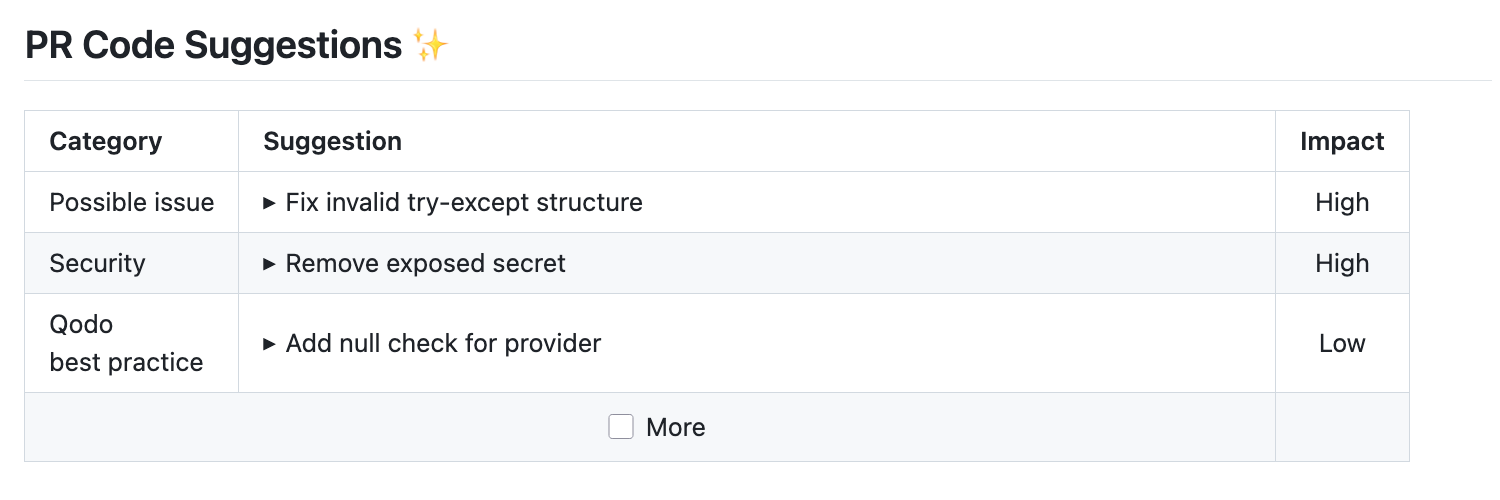
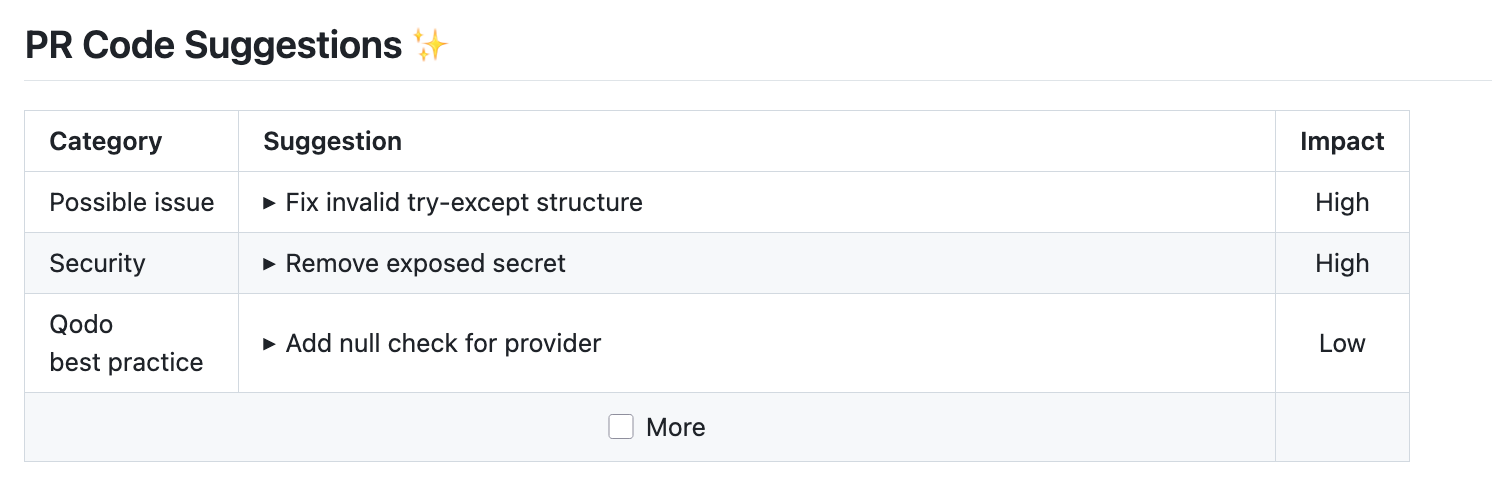
The `improve` tool scans the PR code changes, and automatically generates meaningful suggestions for improving the PR code.
## Example usage
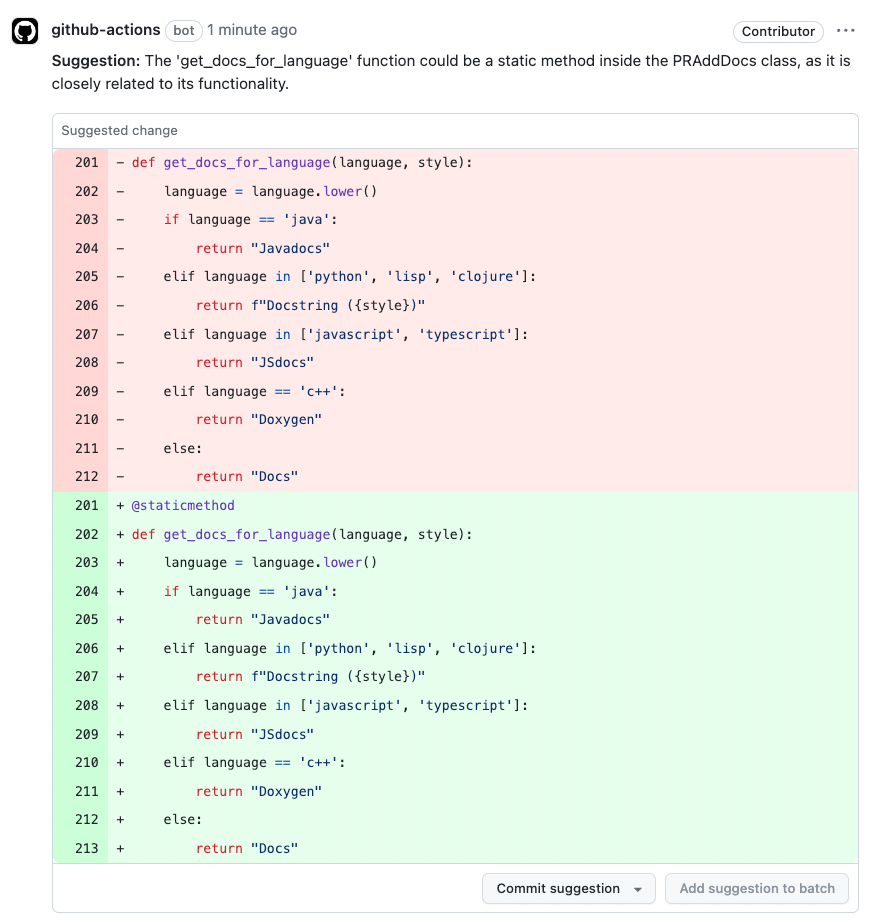 ## How to use the `improve` tool
**Manual usage**
Comment on the PR:
```bash theme={null}
/improve
```
You can also add configuration flags to the command to customize behavior:
```bash theme={null}
/improve --pr_code_suggestions.some_config1=... --pr_code_suggestions.some_config2=...
```
**Automatic usage**
To run the tool automatically when a PR is opened, add it to your [configuration file](/v1/configuration/configuration-file/):
```bash theme={null}
[github_app]
pr_commands = [
"/improve",
...
]
[pr_code_suggestions]
num_code_suggestions_per_chunk = ...
...
```
When you first install Qodo app, the [default mode](https://qodo-merge-docs.qodo.ai/usage-guide/automations_and_usage/#github-app-automatic-tools-when-a-new-pr-is-opened) for the `improve` tool is:
```js theme={null}
pr_commands = ["/improve", ...]
```
Meaning the `improve` tool will run automatically on every PR, without any additional configurations. Edit this field to enable/disable the tool, or to change the configurations used.
### Code suggestions elements
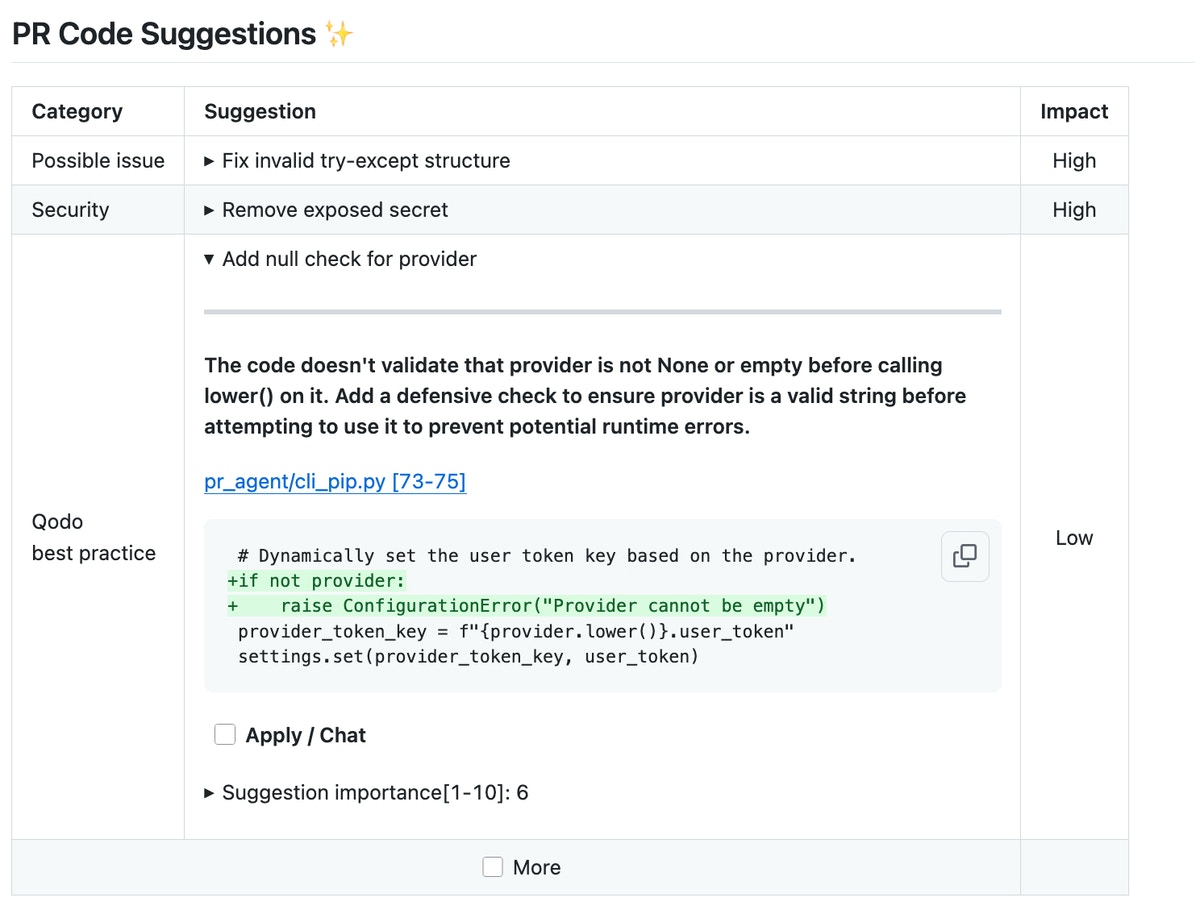
Each generated suggestion consists of three key elements:
1. A single-line summary of the proposed change.
2. An expandable section containing a description of the suggestion.
3. A diff snippet showing the recommended code modification (before and after).
### Interactive options
After using the `improve` tool, you can immediately trigger actions and apply changes with simple checkbox clicks:
* ***Apply this suggestion***\*\* button\*\*: Clicking this checkbox instantly converts a suggestion into a committable code change. When committed to the PR, changes made to code that was flagged for improvement will be marked with a check mark, allowing developers to easily track and review implemented recommendations.
* ***More button***: Triggers additional suggestions generation while keeping each suggestion focused and relevant as the original set
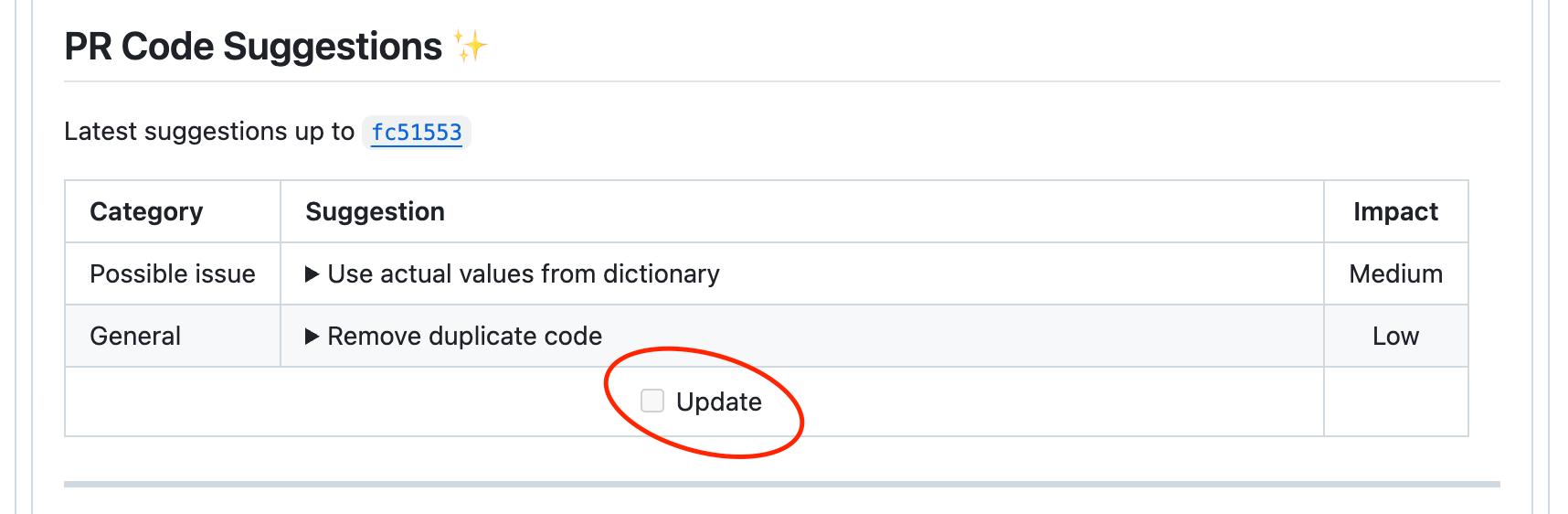
* ***Update***\*\* button\*\*: Triggers a re-analysis of the code, providing updated suggestions based on the latest changes
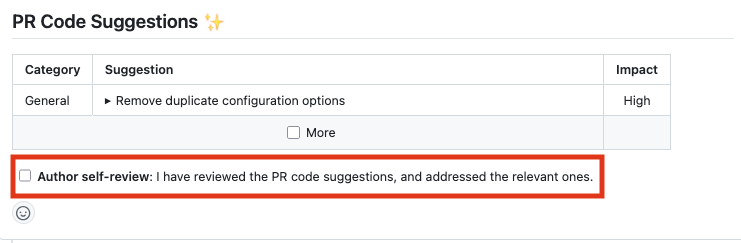
* ***Author self-review***\*\* button\*\*: Interactive acknowledgment that developers have opened and reviewed collapsed suggestions
## Configuration options
### Configuration options table
Configure the `improve` tool by setting configurations under the `pr_code_suggestions` part in your [configuration file](/v1/configuration/configuration-file/).
#### General options
| Possible configurations | Default value | What they do |
| :--------------------------------- | :-------------- | :----------------------------------------------------------------------------------------------------------------------------------------------------------------------------------------- |
| `extra_instructions` | none | Optional extra instructions for the tool. For example: "focus on the changes in the file X", "Ignore changes in ..." |
| `commitable_code_suggestions` | `false` | If set to true, the tool will display the suggestions as committable code comments. |
| `enable_chat_in_code_suggestions` | `true` | If set to true, Qodo will interact with comments made on code changes it has proposed. |
| `dual_publishing_score_threshold` | `-1` (disabled) | Minimum score threshold for suggestions to be presented as committable PR comments. |
| `focus_only_on_problems` | `true` | If set to true, suggestions will focus primarily on identifying and fixing code problems, and less on style considerations like best practices, maintainability, or readability. |
| `persistent_comment` | `true` | If set to true, the improve comment will be persistent, meaning that every new improve request will edit the previous one. |
| `suggestions_score_threshold` | `0` | Any suggestion with importance score less than this threshold will be removed. |
| `apply_suggestions_checkbox` | `true` | Enable a checkbox to create a committable suggestion. |
| `enable_more_suggestions_checkbox` | `true` | Enable a checkbox to generate more suggestions. |
| `enable_help_text` | `true` | If set to true, Qodo will display a help text in the comment. |
| `enable_chat_text` | `true` | If set to true, Qodo will display a reference to the PR chat in the comment. |
| `publish_output_no_suggestions` | `true` | If set to true, Qodo will publish a comment even if no suggestions were found. |
| `wiki_page_accepted_suggestions` | `true` | If set to true, Qodo will automatically track accepted suggestions in a dedicated wiki page called `.pr_agent_accepted_suggestions`. |
| `allow_thumbs_up_down` | `false` | If set to true, all code suggestions will have thumbs up and thumbs down buttons. Note that this feature is for statistics tracking. It will not affect future feedback from the AI model. |
#### Params for number of suggestions and AI calls
| Possible configurations | Default value | What they do |
| :------------------------------- | :------------ | :-------------------------------------------------------------------- |
| `auto_extended_mode` | `true` | Enable chunking the PR code and running the tool on each chunk. |
| `num_code_suggestions_per_chunk` | `3` | Number of code suggestions provided by the 'improve' tool, per chunk. |
| `max_number_of_calls` | `3` | Maximum number of chunks. |
## Other features of the `improve` tool
### Best practices
Another option to give additional guidance to the AI model is by creating a [best\_practices.md file](/v1/features/best-practices) in your repository's root directory.
You can also setup [a wiki page](/v1/configuration/enabling-a-wiki) in GitHub.
### Extra instructions
Extra instructions are important. The `improve` tool can be configured with extra instructions, which can be used to guide Qodo to a feedback tailored to the needs of your project.
Be specific, clear, and concise in the instructions. With extra instructions, you are the prompter. Specify the relevant sub-tool, and the relevant aspects of the PR that you want to emphasize.
Examples of extra instructions:
```bash theme={null}
[pr_code_suggestions]
extra_instructions="""\
(1) Answer in Japanese
(2) Don't suggest to add try-except block
(3) Ignore changes in toml files
...
"""
```
Use **triple quotes** to write multi-line instructions.
### Dual publishing mode
Dual publishing mode allows code suggestions to appear as commit-ready comments in the PR.
This mode helps highlight suggestions that are more critical.
To activate dual publishing mode, use the following setting:
```bash theme={null}
[pr_code_suggestions]
dual_publishing_score_threshold = x # The minimum score threshold >=
```
Where x represents the minimum score threshold (>=) for suggestions to be presented as commitable PR comments in addition to the table. The default value is -1 (disabled).
### Self-review
**Platforms supported: GitHub, GitLab**
You can set the `improve` tool to add a checkbox below the suggestions, prompting users to acknowledge that they have reviewed them.
In your configuration file, set:
```bash theme={null}
[pr_code_suggestions]
demand_code_suggestions_self_review = true
```
You can set the content of the checkbox text via:
```bash theme={null}
[pr_code_suggestions]
code_suggestions_self_review_text = "... (your text here) ..."
```
## How to use the `improve` tool
**Manual usage**
Comment on the PR:
```bash theme={null}
/improve
```
You can also add configuration flags to the command to customize behavior:
```bash theme={null}
/improve --pr_code_suggestions.some_config1=... --pr_code_suggestions.some_config2=...
```
**Automatic usage**
To run the tool automatically when a PR is opened, add it to your [configuration file](/v1/configuration/configuration-file/):
```bash theme={null}
[github_app]
pr_commands = [
"/improve",
...
]
[pr_code_suggestions]
num_code_suggestions_per_chunk = ...
...
```
When you first install Qodo app, the [default mode](https://qodo-merge-docs.qodo.ai/usage-guide/automations_and_usage/#github-app-automatic-tools-when-a-new-pr-is-opened) for the `improve` tool is:
```js theme={null}
pr_commands = ["/improve", ...]
```
Meaning the `improve` tool will run automatically on every PR, without any additional configurations. Edit this field to enable/disable the tool, or to change the configurations used.
### Code suggestions elements
Each generated suggestion consists of three key elements:
1. A single-line summary of the proposed change.
2. An expandable section containing a description of the suggestion.
3. A diff snippet showing the recommended code modification (before and after).
### Interactive options
After using the `improve` tool, you can immediately trigger actions and apply changes with simple checkbox clicks:
* ***Apply this suggestion***\*\* button\*\*: Clicking this checkbox instantly converts a suggestion into a committable code change. When committed to the PR, changes made to code that was flagged for improvement will be marked with a check mark, allowing developers to easily track and review implemented recommendations.
* ***More button***: Triggers additional suggestions generation while keeping each suggestion focused and relevant as the original set
* ***Update***\*\* button\*\*: Triggers a re-analysis of the code, providing updated suggestions based on the latest changes
* ***Author self-review***\*\* button\*\*: Interactive acknowledgment that developers have opened and reviewed collapsed suggestions
## Configuration options
### Configuration options table
Configure the `improve` tool by setting configurations under the `pr_code_suggestions` part in your [configuration file](/v1/configuration/configuration-file/).
#### General options
| Possible configurations | Default value | What they do |
| :--------------------------------- | :-------------- | :----------------------------------------------------------------------------------------------------------------------------------------------------------------------------------------- |
| `extra_instructions` | none | Optional extra instructions for the tool. For example: "focus on the changes in the file X", "Ignore changes in ..." |
| `commitable_code_suggestions` | `false` | If set to true, the tool will display the suggestions as committable code comments. |
| `enable_chat_in_code_suggestions` | `true` | If set to true, Qodo will interact with comments made on code changes it has proposed. |
| `dual_publishing_score_threshold` | `-1` (disabled) | Minimum score threshold for suggestions to be presented as committable PR comments. |
| `focus_only_on_problems` | `true` | If set to true, suggestions will focus primarily on identifying and fixing code problems, and less on style considerations like best practices, maintainability, or readability. |
| `persistent_comment` | `true` | If set to true, the improve comment will be persistent, meaning that every new improve request will edit the previous one. |
| `suggestions_score_threshold` | `0` | Any suggestion with importance score less than this threshold will be removed. |
| `apply_suggestions_checkbox` | `true` | Enable a checkbox to create a committable suggestion. |
| `enable_more_suggestions_checkbox` | `true` | Enable a checkbox to generate more suggestions. |
| `enable_help_text` | `true` | If set to true, Qodo will display a help text in the comment. |
| `enable_chat_text` | `true` | If set to true, Qodo will display a reference to the PR chat in the comment. |
| `publish_output_no_suggestions` | `true` | If set to true, Qodo will publish a comment even if no suggestions were found. |
| `wiki_page_accepted_suggestions` | `true` | If set to true, Qodo will automatically track accepted suggestions in a dedicated wiki page called `.pr_agent_accepted_suggestions`. |
| `allow_thumbs_up_down` | `false` | If set to true, all code suggestions will have thumbs up and thumbs down buttons. Note that this feature is for statistics tracking. It will not affect future feedback from the AI model. |
#### Params for number of suggestions and AI calls
| Possible configurations | Default value | What they do |
| :------------------------------- | :------------ | :-------------------------------------------------------------------- |
| `auto_extended_mode` | `true` | Enable chunking the PR code and running the tool on each chunk. |
| `num_code_suggestions_per_chunk` | `3` | Number of code suggestions provided by the 'improve' tool, per chunk. |
| `max_number_of_calls` | `3` | Maximum number of chunks. |
## Other features of the `improve` tool
### Best practices
Another option to give additional guidance to the AI model is by creating a [best\_practices.md file](/v1/features/best-practices) in your repository's root directory.
You can also setup [a wiki page](/v1/configuration/enabling-a-wiki) in GitHub.
### Extra instructions
Extra instructions are important. The `improve` tool can be configured with extra instructions, which can be used to guide Qodo to a feedback tailored to the needs of your project.
Be specific, clear, and concise in the instructions. With extra instructions, you are the prompter. Specify the relevant sub-tool, and the relevant aspects of the PR that you want to emphasize.
Examples of extra instructions:
```bash theme={null}
[pr_code_suggestions]
extra_instructions="""\
(1) Answer in Japanese
(2) Don't suggest to add try-except block
(3) Ignore changes in toml files
...
"""
```
Use **triple quotes** to write multi-line instructions.
### Dual publishing mode
Dual publishing mode allows code suggestions to appear as commit-ready comments in the PR.
This mode helps highlight suggestions that are more critical.
To activate dual publishing mode, use the following setting:
```bash theme={null}
[pr_code_suggestions]
dual_publishing_score_threshold = x # The minimum score threshold >=
```
Where x represents the minimum score threshold (>=) for suggestions to be presented as commitable PR comments in addition to the table. The default value is -1 (disabled).
### Self-review
**Platforms supported: GitHub, GitLab**
You can set the `improve` tool to add a checkbox below the suggestions, prompting users to acknowledge that they have reviewed them.
In your configuration file, set:
```bash theme={null}
[pr_code_suggestions]
demand_code_suggestions_self_review = true
```
You can set the content of the checkbox text via:
```bash theme={null}
[pr_code_suggestions]
code_suggestions_self_review_text = "... (your text here) ..."
```
 ### Make self-review mandatory
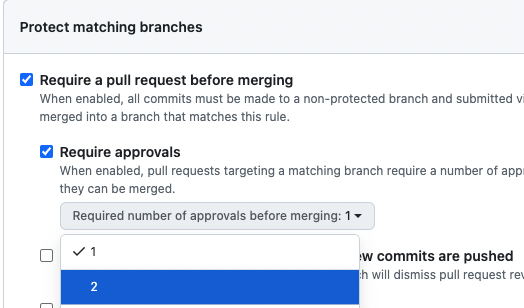
To enforce self-review before merging, add the following to your configuration file:
```bash theme={null}
[pr_code_suggestions]
approve_pr_on_self_review = true
```
This allows Qodo to automatically approve the PR when the author checks the self-review box.
When used together with a minimum of 2 as the required number of approvals, this ensures the PR author must complete a self-review for the PR to be mergeable.
### Make self-review mandatory
To enforce self-review before merging, add the following to your configuration file:
```bash theme={null}
[pr_code_suggestions]
approve_pr_on_self_review = true
```
This allows Qodo to automatically approve the PR when the author checks the self-review box.
When used together with a minimum of 2 as the required number of approvals, this ensures the PR author must complete a self-review for the PR to be mergeable.
 ### Auto-approval
**Platforms supported: GitHub, GitLab, Bitbucket**
Qodo can auto-approve a PR when a specific comment is invoked, or when the PR meets certain criteria.
To ensure safety, the auto-approval feature is disabled by default.
**Note**: the approval flags cannot be set as command line arguments, only in the configuration file.
To enable auto-approval features, you need to set one or both of the following options in your configuration file:
1. **Auto-approval by commenting**
To enable auto-approval by commenting, set in the configuration file:
```bash theme={null}
[config]
enable_comment_approval = true
```
After setting, comment on a PR:
```bash theme={null}
/review auto_approve
```
Qodo will automatically approve the PR, and add a comment with the approval.
2. **Auto-approval when the PR meets a condition**
To enable auto-approval based on specific criteria, set in the configuration file:
```bash theme={null}
[config]
enable_auto_approval = true
```
You can configure auto-approval to trigger based on either of these two conditions:
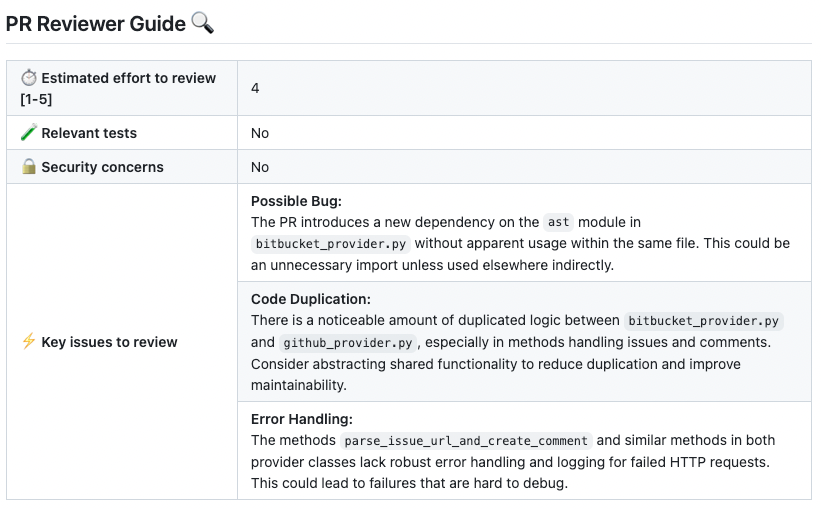
1. **Review effort score**
```bash theme={null}
[config]
enable_auto_approval = true
auto_approve_for_low_review_effort = X # X is a number between 1 to 5
```
When the review effort score is lower or equal to X, the PR will be auto-approved.
### Auto-approval
**Platforms supported: GitHub, GitLab, Bitbucket**
Qodo can auto-approve a PR when a specific comment is invoked, or when the PR meets certain criteria.
To ensure safety, the auto-approval feature is disabled by default.
**Note**: the approval flags cannot be set as command line arguments, only in the configuration file.
To enable auto-approval features, you need to set one or both of the following options in your configuration file:
1. **Auto-approval by commenting**
To enable auto-approval by commenting, set in the configuration file:
```bash theme={null}
[config]
enable_comment_approval = true
```
After setting, comment on a PR:
```bash theme={null}
/review auto_approve
```
Qodo will automatically approve the PR, and add a comment with the approval.
2. **Auto-approval when the PR meets a condition**
To enable auto-approval based on specific criteria, set in the configuration file:
```bash theme={null}
[config]
enable_auto_approval = true
```
You can configure auto-approval to trigger based on either of these two conditions:
1. **Review effort score**
```bash theme={null}
[config]
enable_auto_approval = true
auto_approve_for_low_review_effort = X # X is a number between 1 to 5
```
When the review effort score is lower or equal to X, the PR will be auto-approved.
 2. **No code suggestions**
```bash theme={null}
[config]
enable_auto_approval = true
auto_approve_for_no_suggestions = true
```
When no code suggestion were found for the PR, the PR will be auto-approved.
2. **No code suggestions**
```bash theme={null}
[config]
enable_auto_approval = true
auto_approve_for_no_suggestions = true
```
When no code suggestion were found for the PR, the PR will be auto-approved.
 ### Automatic updates on new commits - the Update button
When new commits are pushed after a recent code suggestions report on a pull request, an **Update** button appears (as shown below).
Clicking this button triggers the `/improve` tool, which:
1. Detects what's changed since the last report
2. Generates suggestions based on those new changes
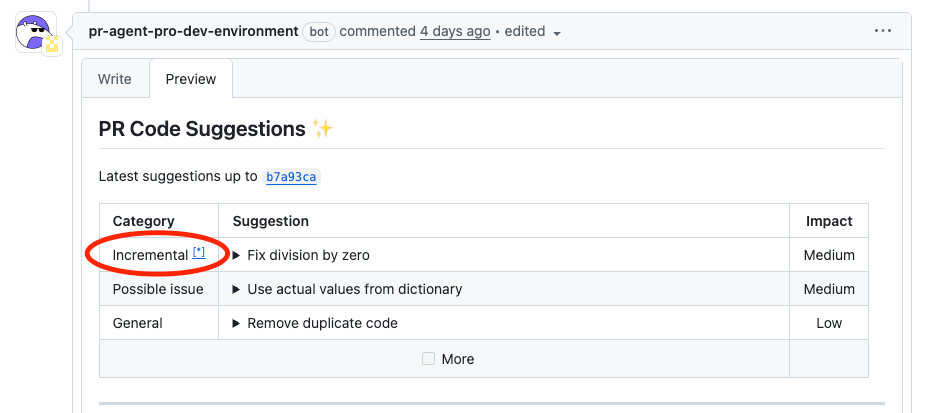
3. Merges these suggestions with the overall PR feedback, highlighting recent updates
4. Marks change-related comments with a note and an asterisk (\*), including a link to this page for easy reference
**Benefits for Developers**
* **Stay focused:** Get feedback on the most recent changes first
* **Stay organized:** Comments related to new commits are clearly marked
* **Stay efficient:** Tackle feedback in order, starting with what's new
### Automatic updates on new commits - the Update button
When new commits are pushed after a recent code suggestions report on a pull request, an **Update** button appears (as shown below).
Clicking this button triggers the `/improve` tool, which:
1. Detects what's changed since the last report
2. Generates suggestions based on those new changes
3. Merges these suggestions with the overall PR feedback, highlighting recent updates
4. Marks change-related comments with a note and an asterisk (\*), including a link to this page for easy reference
**Benefits for Developers**
* **Stay focused:** Get feedback on the most recent changes first
* **Stay organized:** Comments related to new commits are clearly marked
* **Stay efficient:** Tackle feedback in order, starting with what's new