> ## Documentation Index
> Fetch the complete documentation index at: https://docs.qodo.ai/llms.txt
> Use this file to discover all available pages before exploring further.
# Monitor and manage repositories
> Monitor each repository's connection health and PR history indexing, both of which affect code review coverage, and control code review status per repository.
The **Repositories** tab lists all repositories Qodo has access to, across all your installations and providers. Each repository belongs to a single installation.
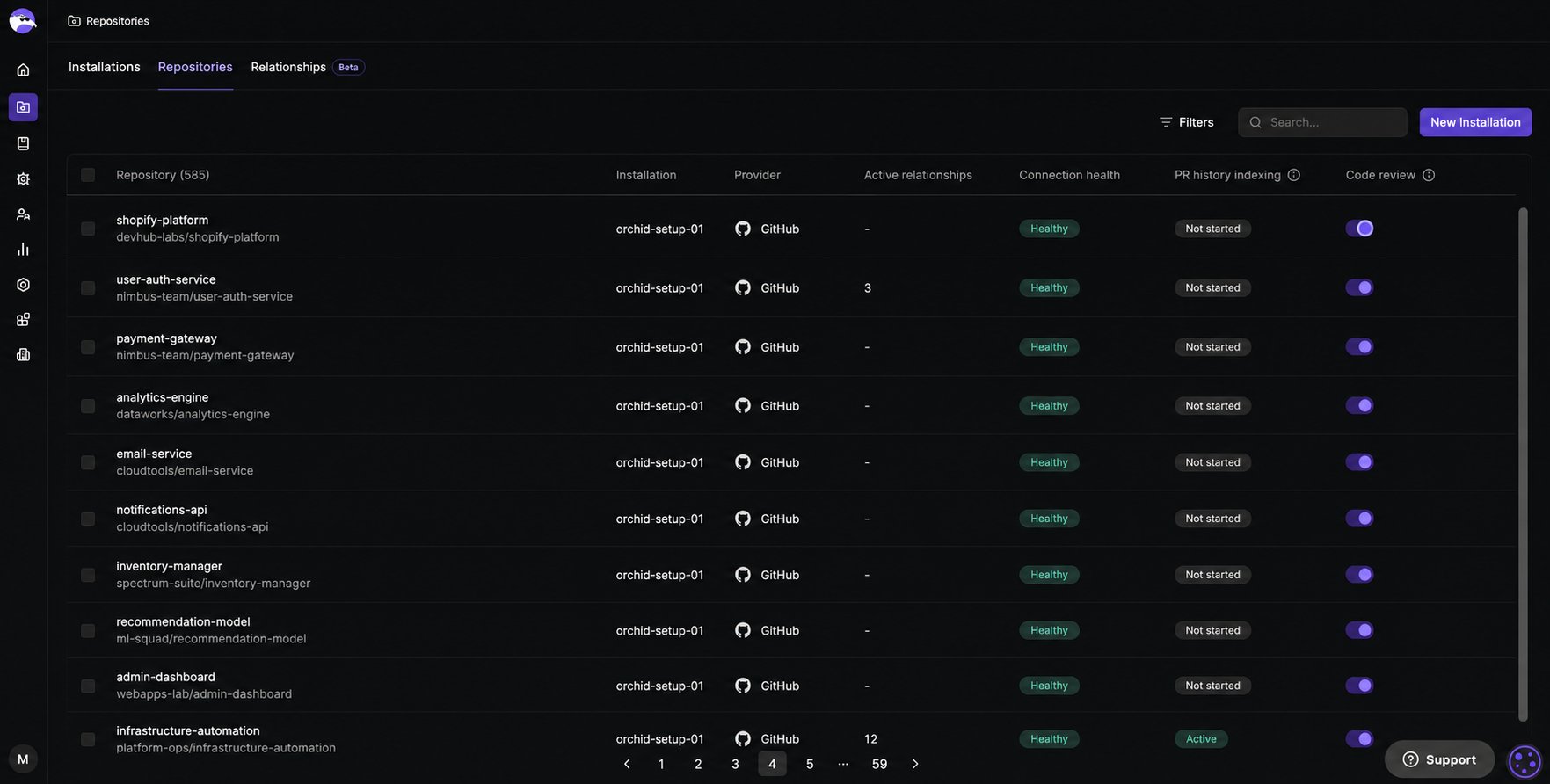 ## Repositories tab reference
| Field | Description |
| ------------------------ | ------------------------------------------------------------------------------------------------------------------------------------------------------------------------------------------------------------------------------------------- |
| **Repository** | Repository name and path. |
| **Installation** | The installation this repository belongs to. |
| **Provider** | The Git provider for this repository. |
| **Active relationships** | Number of active cross-repo relationships defined for this repository. |
| **Connection health** | The current connection health for this repository, shown as a status badge. Hover a badge for details on its status. See [Connection health](#check-repository-connection-health) below. |
| **PR history indexing** | Indexing progress of the repository's merged pull request history, shown as a status badge. This history powers Rule Miner and Relevance. See [PR history indexing](#check-repository-pr-history-indexing-status) below. |
| **Code review** | Toggle to enable or disable Qodo code review for this repository. When disabled, code review is turned off but indexing continues, keeping the repository available for [cross-repository code review](/governance/cross-repo-code-review). |
## Check repository connection health
Check connection health to catch a broken connection before it stops Qodo from reviewing pull requests in that repository. The **Connection health** column shows the current status for each repository.
| Status | Description |
| ------------ | ---------------------------------------------------------------------------------------------------------------------------------------------------------- |
| **Healthy** | Events are flowing normally. |
| **Degraded** | Delivery is auto-retrying after recent failures. |
| **Disabled** | Connection is off. Reconnect the installation. |
| **Pending** | Qodo is verifying the connection. Shown for a newly added repository even under an already-healthy installation, until its own connection check completes. |
| **Unknown** | Connection health isn't available for this provider yet. |
## Check repository PR history indexing status
Qodo indexes a repository's merged pull request history in the background to power learning features such as [Rule Miner](/governance/rule-enforcement/rule-miner) and [Relevance](/code-review/relevance). The **PR history indexing** column is the visibility into that process, showing whether history has finished indexing, is still catching up, or failed. See [Understanding PR history indexing](/core-concepts/pr-history) for how Qodo uses this history once indexed.
| Status | Description |
| --------------- | -------------------------------------------------------------------------------------------------------------------------------------------------------------------- |
| **Not started** | No indexing run has happened yet for this repository. Indexing starts automatically once the repository's first pull request is opened. |
| **Indexing** | The initial indexing run is in progress, including any retry attempts. |
| **Active** | At least one full indexing run has completed successfully. Indexed history is available. |
| **Updating** | An incremental indexing run (triggered by new merged pull requests) is in progress. Previously indexed history remains available. |
| **Active\*** | Indexed history is available, but the most recent incremental run failed repeatedly. Contact [Qodo support](https://help.qodo.ai/hc/en-us/requests/new) for details. |
| **Failed** | The initial indexing run failed after all retries. Contact [Qodo support](https://help.qodo.ai/hc/en-us/requests/new) for details. |
Check this status to confirm a repository has enough indexed history for Rule Miner and Relevance to work. If a repository isn't producing results, see [Rule Miner or Relevance isn't producing results](/code-review/troubleshooting/rule-miner-or-relevance-not-producing-results).
## Search or filter repositories
Use the **Search** bar to find a specific repository by name. Use the **Filters** menu to narrow the list by installation, provider, or code review status, useful for auditing coverage, for example to confirm every repository in a newly added installation has code review enabled.
## Enable or disable code review for a single repository
When a new installation is added, code review is disabled for all repositories by default. You control which repositories Qodo actively covers.
* Toggle **Code review** on or off in the repository's row. The change applies immediately.
## Manage code review in bulk
Enable or disable code review for multiple repositories at once from the **Repositories** tab, useful when onboarding several repositories together or rolling out a coverage change without toggling each one individually.
Select the checkbox next to each repository, or select the checkbox in the table's top row to select every repository at once.
## Repositories tab reference
| Field | Description |
| ------------------------ | ------------------------------------------------------------------------------------------------------------------------------------------------------------------------------------------------------------------------------------------- |
| **Repository** | Repository name and path. |
| **Installation** | The installation this repository belongs to. |
| **Provider** | The Git provider for this repository. |
| **Active relationships** | Number of active cross-repo relationships defined for this repository. |
| **Connection health** | The current connection health for this repository, shown as a status badge. Hover a badge for details on its status. See [Connection health](#check-repository-connection-health) below. |
| **PR history indexing** | Indexing progress of the repository's merged pull request history, shown as a status badge. This history powers Rule Miner and Relevance. See [PR history indexing](#check-repository-pr-history-indexing-status) below. |
| **Code review** | Toggle to enable or disable Qodo code review for this repository. When disabled, code review is turned off but indexing continues, keeping the repository available for [cross-repository code review](/governance/cross-repo-code-review). |
## Check repository connection health
Check connection health to catch a broken connection before it stops Qodo from reviewing pull requests in that repository. The **Connection health** column shows the current status for each repository.
| Status | Description |
| ------------ | ---------------------------------------------------------------------------------------------------------------------------------------------------------- |
| **Healthy** | Events are flowing normally. |
| **Degraded** | Delivery is auto-retrying after recent failures. |
| **Disabled** | Connection is off. Reconnect the installation. |
| **Pending** | Qodo is verifying the connection. Shown for a newly added repository even under an already-healthy installation, until its own connection check completes. |
| **Unknown** | Connection health isn't available for this provider yet. |
## Check repository PR history indexing status
Qodo indexes a repository's merged pull request history in the background to power learning features such as [Rule Miner](/governance/rule-enforcement/rule-miner) and [Relevance](/code-review/relevance). The **PR history indexing** column is the visibility into that process, showing whether history has finished indexing, is still catching up, or failed. See [Understanding PR history indexing](/core-concepts/pr-history) for how Qodo uses this history once indexed.
| Status | Description |
| --------------- | -------------------------------------------------------------------------------------------------------------------------------------------------------------------- |
| **Not started** | No indexing run has happened yet for this repository. Indexing starts automatically once the repository's first pull request is opened. |
| **Indexing** | The initial indexing run is in progress, including any retry attempts. |
| **Active** | At least one full indexing run has completed successfully. Indexed history is available. |
| **Updating** | An incremental indexing run (triggered by new merged pull requests) is in progress. Previously indexed history remains available. |
| **Active\*** | Indexed history is available, but the most recent incremental run failed repeatedly. Contact [Qodo support](https://help.qodo.ai/hc/en-us/requests/new) for details. |
| **Failed** | The initial indexing run failed after all retries. Contact [Qodo support](https://help.qodo.ai/hc/en-us/requests/new) for details. |
Check this status to confirm a repository has enough indexed history for Rule Miner and Relevance to work. If a repository isn't producing results, see [Rule Miner or Relevance isn't producing results](/code-review/troubleshooting/rule-miner-or-relevance-not-producing-results).
## Search or filter repositories
Use the **Search** bar to find a specific repository by name. Use the **Filters** menu to narrow the list by installation, provider, or code review status, useful for auditing coverage, for example to confirm every repository in a newly added installation has code review enabled.
## Enable or disable code review for a single repository
When a new installation is added, code review is disabled for all repositories by default. You control which repositories Qodo actively covers.
* Toggle **Code review** on or off in the repository's row. The change applies immediately.
## Manage code review in bulk
Enable or disable code review for multiple repositories at once from the **Repositories** tab, useful when onboarding several repositories together or rolling out a coverage change without toggling each one individually.
Select the checkbox next to each repository, or select the checkbox in the table's top row to select every repository at once.
 Select **Enable code review** or **Disable code review** from the bar that appears at the bottom of the table. The action applies immediately to every selected repository.
## Add or remove cross-repository relationships for a repository
Define relationships between related repositories to let Qodo detect breaking changes across them during code review.
* Select **Add repositories** from a repository's three-dot menu to open the sidebar, where you can create, edit, or delete relationships. See [Manage cross-repository relationships](/governance/cross-repo-code-review/repository-relationships) for more details.
## Customize configuration for a single repository
Apply configuration changes to just one repository instead of your entire organization.
* Select **Configuration** from a repository's three-dot menu to open the Configurations page with that repository already selected, applying your changes at the repository level. See [Configure Qodo using the portal](/install-and-configure/configuration-overview/portal-configuration#configuration-levels-organization-and-repository) for the available settings.
## View repository information
Click any row, or select **Edit repo** from its three-dot menu, to open the sidebar for a closer look at a single repository, with more detail on its indexing and relationships. The sidebar has three sections:
* **Overview:** Enable or disable code review for the repository, and open it directly in your Git provider.
* **PR history indexing:** Indexing detail for the repository's pull request history. See [PR history indexing detail](#pr-history-indexing-detail) below.
* **Cross repository relationships:** All relationships defined for that repository. See [Cross repository relationships](#cross-repository-relationships) below.
### PR history indexing detail
The repository sidebar's **PR history indexing** section shows:
| Field | Description |
| --------------------- | ------------------------------------------------------------------------------------------------------------------------------- |
| **Status** | The current indexing status for this repository. See [PR history indexing](#check-repository-pr-history-indexing-status) above. |
| **Last updated** | When this repository's indexing status was last updated. |
| **Pull requests** | Number of merged pull requests indexed. |
| **Findings learned** | Number of things Rule Miner and Relevance have learned from the indexed pull request history. |
| **History covered** | Date range from the first to the most recently indexed merged pull request. |
| **What this unlocks** | Which learning features (Rule Miner, Relevance) have enough indexed history to run for this repository. |
### Cross repository relationships
For each relationship, you can see the linked repository, relationship type, description, and status.
## Best practices for managing code review coverage
* **Check connection health regularly:** A repository showing an error means Qodo cannot review pull requests in it. Scanning the **Connection health** column as part of your operational review helps catch a broken connection before it causes gaps in coverage.
* **Use filters to audit coverage:** Filter by installation, provider, or code review status to verify that all expected repositories are connected and have code review enabled. This is especially useful after adding a new installation.
* **Be deliberate about what you enable:** New installations default to code review disabled. Onboard repositories intentionally rather than activating Qodo everywhere at once, so you can track rollout and keep your connection inventory accurate. When code review is disabled, indexing continues so the repository remains available for cross-repo context.
## Next steps
* [Manage Git repositories by installation](/governance/repositories/installations): Add installations and resolve connection errors.
* [View cross-repository relationships](/governance/repositories/relationships): View and audit cross-repository relationships across your organization.
* [Rule Miner](/governance/rule-enforcement/rule-miner): See how PR history indexing turns into rules.
* [Relevance](/code-review/relevance): See how PR history indexing helps prioritize findings.
Select **Enable code review** or **Disable code review** from the bar that appears at the bottom of the table. The action applies immediately to every selected repository.
## Add or remove cross-repository relationships for a repository
Define relationships between related repositories to let Qodo detect breaking changes across them during code review.
* Select **Add repositories** from a repository's three-dot menu to open the sidebar, where you can create, edit, or delete relationships. See [Manage cross-repository relationships](/governance/cross-repo-code-review/repository-relationships) for more details.
## Customize configuration for a single repository
Apply configuration changes to just one repository instead of your entire organization.
* Select **Configuration** from a repository's three-dot menu to open the Configurations page with that repository already selected, applying your changes at the repository level. See [Configure Qodo using the portal](/install-and-configure/configuration-overview/portal-configuration#configuration-levels-organization-and-repository) for the available settings.
## View repository information
Click any row, or select **Edit repo** from its three-dot menu, to open the sidebar for a closer look at a single repository, with more detail on its indexing and relationships. The sidebar has three sections:
* **Overview:** Enable or disable code review for the repository, and open it directly in your Git provider.
* **PR history indexing:** Indexing detail for the repository's pull request history. See [PR history indexing detail](#pr-history-indexing-detail) below.
* **Cross repository relationships:** All relationships defined for that repository. See [Cross repository relationships](#cross-repository-relationships) below.
### PR history indexing detail
The repository sidebar's **PR history indexing** section shows:
| Field | Description |
| --------------------- | ------------------------------------------------------------------------------------------------------------------------------- |
| **Status** | The current indexing status for this repository. See [PR history indexing](#check-repository-pr-history-indexing-status) above. |
| **Last updated** | When this repository's indexing status was last updated. |
| **Pull requests** | Number of merged pull requests indexed. |
| **Findings learned** | Number of things Rule Miner and Relevance have learned from the indexed pull request history. |
| **History covered** | Date range from the first to the most recently indexed merged pull request. |
| **What this unlocks** | Which learning features (Rule Miner, Relevance) have enough indexed history to run for this repository. |
### Cross repository relationships
For each relationship, you can see the linked repository, relationship type, description, and status.
## Best practices for managing code review coverage
* **Check connection health regularly:** A repository showing an error means Qodo cannot review pull requests in it. Scanning the **Connection health** column as part of your operational review helps catch a broken connection before it causes gaps in coverage.
* **Use filters to audit coverage:** Filter by installation, provider, or code review status to verify that all expected repositories are connected and have code review enabled. This is especially useful after adding a new installation.
* **Be deliberate about what you enable:** New installations default to code review disabled. Onboard repositories intentionally rather than activating Qodo everywhere at once, so you can track rollout and keep your connection inventory accurate. When code review is disabled, indexing continues so the repository remains available for cross-repo context.
## Next steps
* [Manage Git repositories by installation](/governance/repositories/installations): Add installations and resolve connection errors.
* [View cross-repository relationships](/governance/repositories/relationships): View and audit cross-repository relationships across your organization.
* [Rule Miner](/governance/rule-enforcement/rule-miner): See how PR history indexing turns into rules.
* [Relevance](/code-review/relevance): See how PR history indexing helps prioritize findings.