> ## Documentation Index
> Fetch the complete documentation index at: https://docs.qodo.ai/llms.txt
> Use this file to discover all available pages before exploring further.
# Generate a PR summary
> Qodo generates a structured pull request summary to help reviewers quickly understand the scope and impact of a change.
export const AzureIcon = () => ;
Qodo reviews the full codebase, not just the diff, to generate a structured summary of the pull request (PR) that gives reviewers meaningful context before they look at a single line of code. The summary captures the intent of the change, estimates how long the review will take, surfaces high-level suggestions, and diagrams the architecture where relevant.
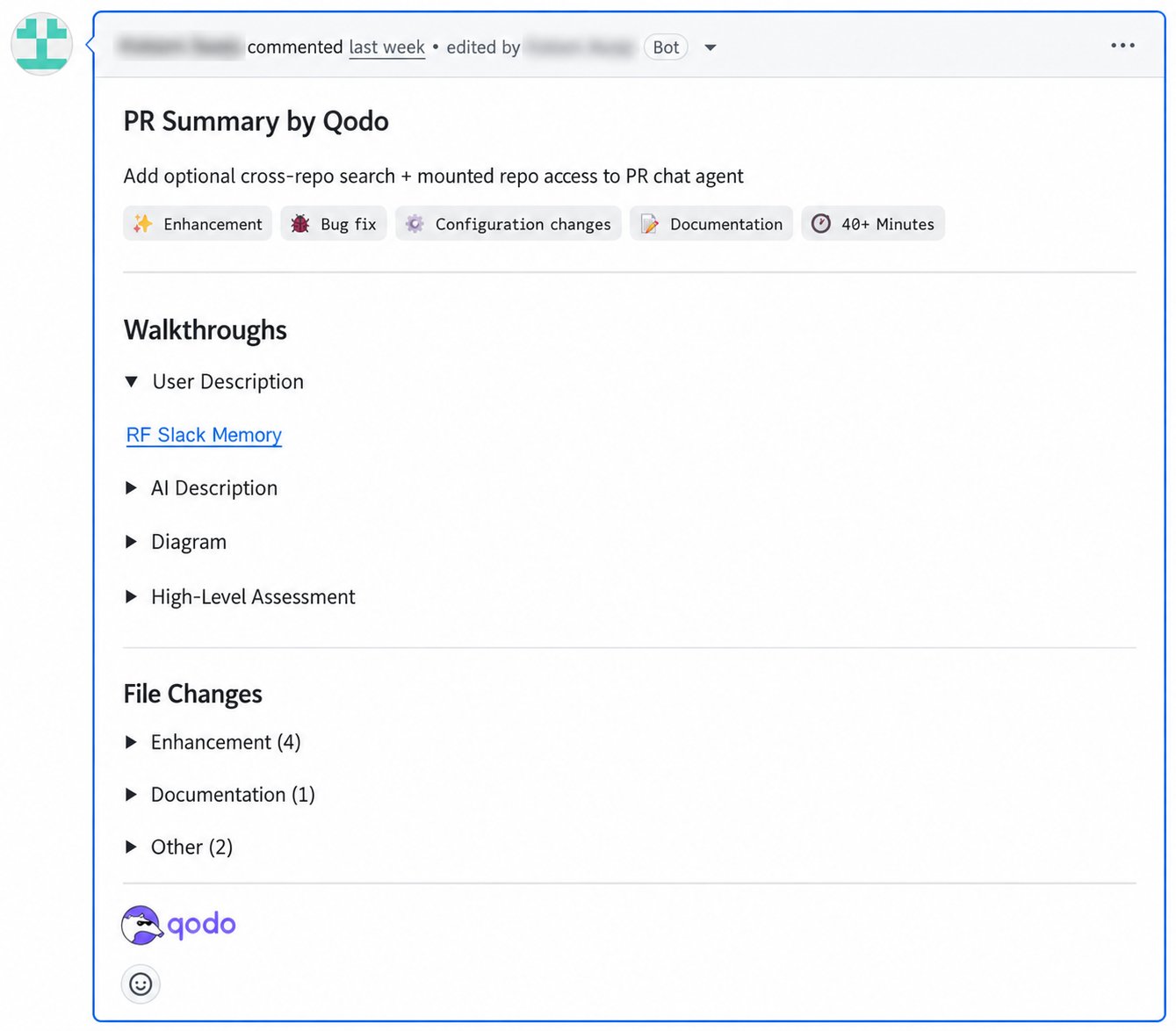
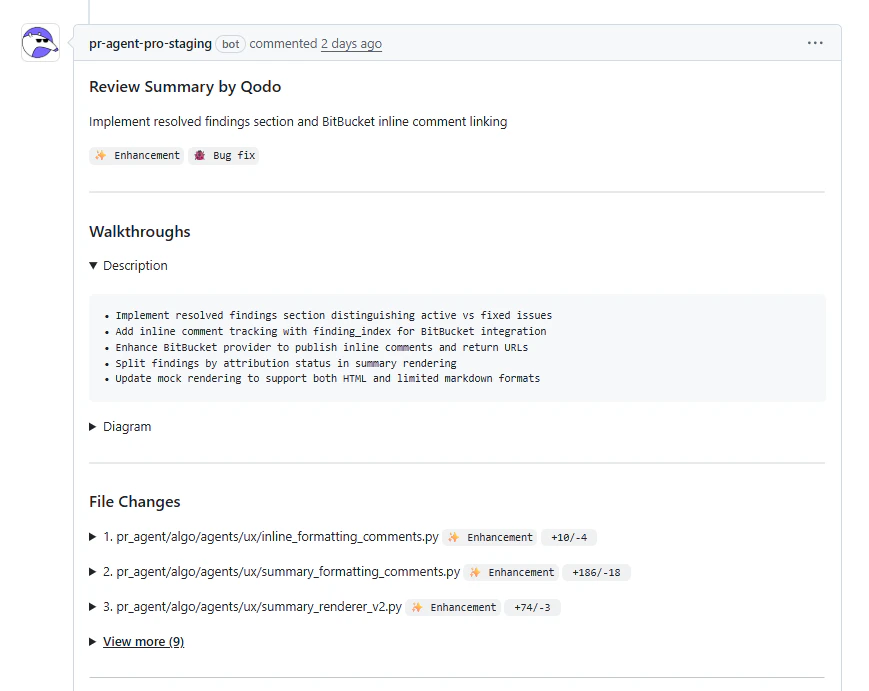
The summary includes:
* **Summary, tags, and time estimate:** A brief summary of the PR's intent, followed by tags (Bug fix, Tests, Enhancement, Documentation, or Configuration changes) and a time estimate, so reviewers can prioritize before opening a single file.
* **Walkthroughs:** A Description, Diagram, and High-Level Assessment that break down what changed, how, and why.
* **File Changes:** Modified files grouped by category, for a quick view of the change surface.
See [Comment anatomy](/code-review/comment-anatomy#high-level-context) for a full description of each section.
## Generate a PR summary
Qodo can generate a PR summary manually or automatically.
### Manually
Comment on the pull request:
`/agentic_describe`
Qodo acknowledges the request and posts the generated summary directly in the pull request.
### Automatically
Qodo generates a summary automatically when a pull request is opened or updated. This is the default behavior.
If you want to change the default behavior, use one of the following methods.
#### Configure in the Qodo portal (recommended)
1. Navigate to the Qodo portal > **Configurations** > **Code review**.
2. Set **PR summary trigger** to **Manual only** (generated using `/agentic_describe`) or **Published PRs** (generated automatically when a PR is published, default).
See [Configure Qodo using the portal](/install-and-configure/configuration-overview/portal-configuration#code-review) for more on portal configurations.
#### Configure in the .pr\_agent.toml file
See [Configure using .pr\_agent.toml](/install-and-configure/configuration-overview/configuration-file) to adjust this behavior.
## Configure the PR summary
### Set the location of the summary in the pull request
By default, Qodo posts the PR summary as a standalone comment and does not modify the pull request description. To publish it in the pull request description instead, or let Qodo choose dynamically, see [Comment location](/code-review/comment-location).
### Publish the review time estimate as a native label/tag
GitHubGitLabAzure DevOps
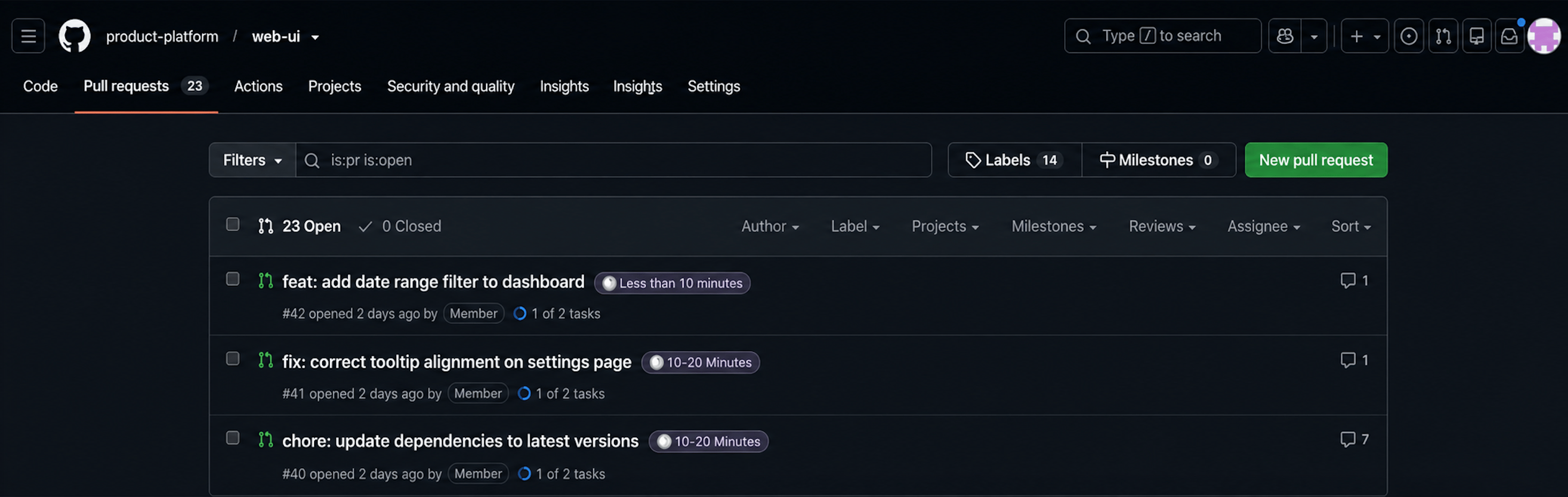
As pull request volume grows, seeing the review effort directly in your Git provider's pull request list makes it easier to compare and triage which reviews to tackle first, without opening each one.
1. Navigate to the Qodo portal > **Configurations** > **Code review**.
2. Under **PR Summary**, enable **Publish review time estimate label**.
Qodo then applies the review time estimate as a native pull request tag (Azure DevOps) or label (GitHub, GitLab), in addition to the estimate already displayed inside the summary. It's visible on the pull request and in the pull request list (for example, "10-20 Minutes"), without opening the summary. Disabled by default.
## Next steps
* [Configuration fundamentals](/install-and-configure/configuration-overview): Customize how and when summaries are generated.
* [Configure Qodo using the portal](/install-and-configure/configuration-overview/portal-configuration#code-review): Manage code review settings centrally from the Qodo portal Configurations page.
* [Comment anatomy](/code-review/comment-anatomy): Understand how Qodo structures findings in pull requests.
 The summary includes:
* **Summary, tags, and time estimate:** A brief summary of the PR's intent, followed by tags (Bug fix, Tests, Enhancement, Documentation, or Configuration changes) and a time estimate, so reviewers can prioritize before opening a single file.
* **Walkthroughs:** A Description, Diagram, and High-Level Assessment that break down what changed, how, and why.
* **File Changes:** Modified files grouped by category, for a quick view of the change surface.
The summary includes:
* **Summary, tags, and time estimate:** A brief summary of the PR's intent, followed by tags (Bug fix, Tests, Enhancement, Documentation, or Configuration changes) and a time estimate, so reviewers can prioritize before opening a single file.
* **Walkthroughs:** A Description, Diagram, and High-Level Assessment that break down what changed, how, and why.
* **File Changes:** Modified files grouped by category, for a quick view of the change surface.
 See [Comment anatomy](/code-review/comment-anatomy#high-level-context) for a full description of each section.
## Generate a PR summary
Qodo can generate a PR summary manually or automatically.
### Manually
Comment on the pull request:
`/agentic_describe`
Qodo acknowledges the request and posts the generated summary directly in the pull request.
### Automatically
Qodo generates a summary automatically when a pull request is opened or updated. This is the default behavior.
If you want to change the default behavior, use one of the following methods.
#### Configure in the Qodo portal (recommended)
1. Navigate to the Qodo portal > **Configurations** > **Code review**.
2. Set **PR summary trigger** to **Manual only** (generated using `/agentic_describe`) or **Published PRs** (generated automatically when a PR is published, default).
See [Configure Qodo using the portal](/install-and-configure/configuration-overview/portal-configuration#code-review) for more on portal configurations.
#### Configure in the .pr\_agent.toml file
See [Configure using .pr\_agent.toml](/install-and-configure/configuration-overview/configuration-file) to adjust this behavior.
## Configure the PR summary
### Set the location of the summary in the pull request
By default, Qodo posts the PR summary as a standalone comment and does not modify the pull request description. To publish it in the pull request description instead, or let Qodo choose dynamically, see [Comment location](/code-review/comment-location).
### Publish the review time estimate as a native label/tag
See [Comment anatomy](/code-review/comment-anatomy#high-level-context) for a full description of each section.
## Generate a PR summary
Qodo can generate a PR summary manually or automatically.
### Manually
Comment on the pull request:
`/agentic_describe`
Qodo acknowledges the request and posts the generated summary directly in the pull request.
### Automatically
Qodo generates a summary automatically when a pull request is opened or updated. This is the default behavior.
If you want to change the default behavior, use one of the following methods.
#### Configure in the Qodo portal (recommended)
1. Navigate to the Qodo portal > **Configurations** > **Code review**.
2. Set **PR summary trigger** to **Manual only** (generated using `/agentic_describe`) or **Published PRs** (generated automatically when a PR is published, default).
See [Configure Qodo using the portal](/install-and-configure/configuration-overview/portal-configuration#code-review) for more on portal configurations.
#### Configure in the .pr\_agent.toml file
See [Configure using .pr\_agent.toml](/install-and-configure/configuration-overview/configuration-file) to adjust this behavior.
## Configure the PR summary
### Set the location of the summary in the pull request
By default, Qodo posts the PR summary as a standalone comment and does not modify the pull request description. To publish it in the pull request description instead, or let Qodo choose dynamically, see [Comment location](/code-review/comment-location).
### Publish the review time estimate as a native label/tag
 1. Navigate to the Qodo portal > **Configurations** > **Code review**.
2. Under **PR Summary**, enable **Publish review time estimate label**.
Qodo then applies the review time estimate as a native pull request tag (Azure DevOps) or label (GitHub, GitLab), in addition to the estimate already displayed inside the summary. It's visible on the pull request and in the pull request list (for example, "10-20 Minutes"), without opening the summary. Disabled by default.
## Next steps
* [Configuration fundamentals](/install-and-configure/configuration-overview): Customize how and when summaries are generated.
* [Configure Qodo using the portal](/install-and-configure/configuration-overview/portal-configuration#code-review): Manage code review settings centrally from the Qodo portal Configurations page.
* [Comment anatomy](/code-review/comment-anatomy): Understand how Qodo structures findings in pull requests.
1. Navigate to the Qodo portal > **Configurations** > **Code review**.
2. Under **PR Summary**, enable **Publish review time estimate label**.
Qodo then applies the review time estimate as a native pull request tag (Azure DevOps) or label (GitHub, GitLab), in addition to the estimate already displayed inside the summary. It's visible on the pull request and in the pull request list (for example, "10-20 Minutes"), without opening the summary. Disabled by default.
## Next steps
* [Configuration fundamentals](/install-and-configure/configuration-overview): Customize how and when summaries are generated.
* [Configure Qodo using the portal](/install-and-configure/configuration-overview/portal-configuration#code-review): Manage code review settings centrally from the Qodo portal Configurations page.
* [Comment anatomy](/code-review/comment-anatomy): Understand how Qodo structures findings in pull requests.