> ## Documentation Index
> Fetch the complete documentation index at: https://docs.qodo.ai/llms.txt
> Use this file to discover all available pages before exploring further.
# Anatomy of a Qodo Code Review
> Qodo surfaces code review feedback directly inside your pull requests in a way that is actionable, focused, and easy to resolve.
Qodo's code review surfaces feedback directly inside your pull requests, structured incrementally from context to individual findings, so you can read, prioritize, and act on it without wading through noise. Each finding focuses on what requires attention and why, with clear links back to the relevant code.
This page is a reference for that structure: each section below corresponds to a part of the pull request, in the order it appears.
New to Qodo? It's recommended to read this reference page top to bottom. Already reviewing a pull request? Skip ahead to [Unpack a code review finding](#unpack-a-code-review-finding).
## Pull request summary
Before presenting individual issues, Qodo provides context to help you understand *what changed* and *why it matters*. See [Generate a PR summary](/code-review/pr-summary) for how this context is generated and configured.
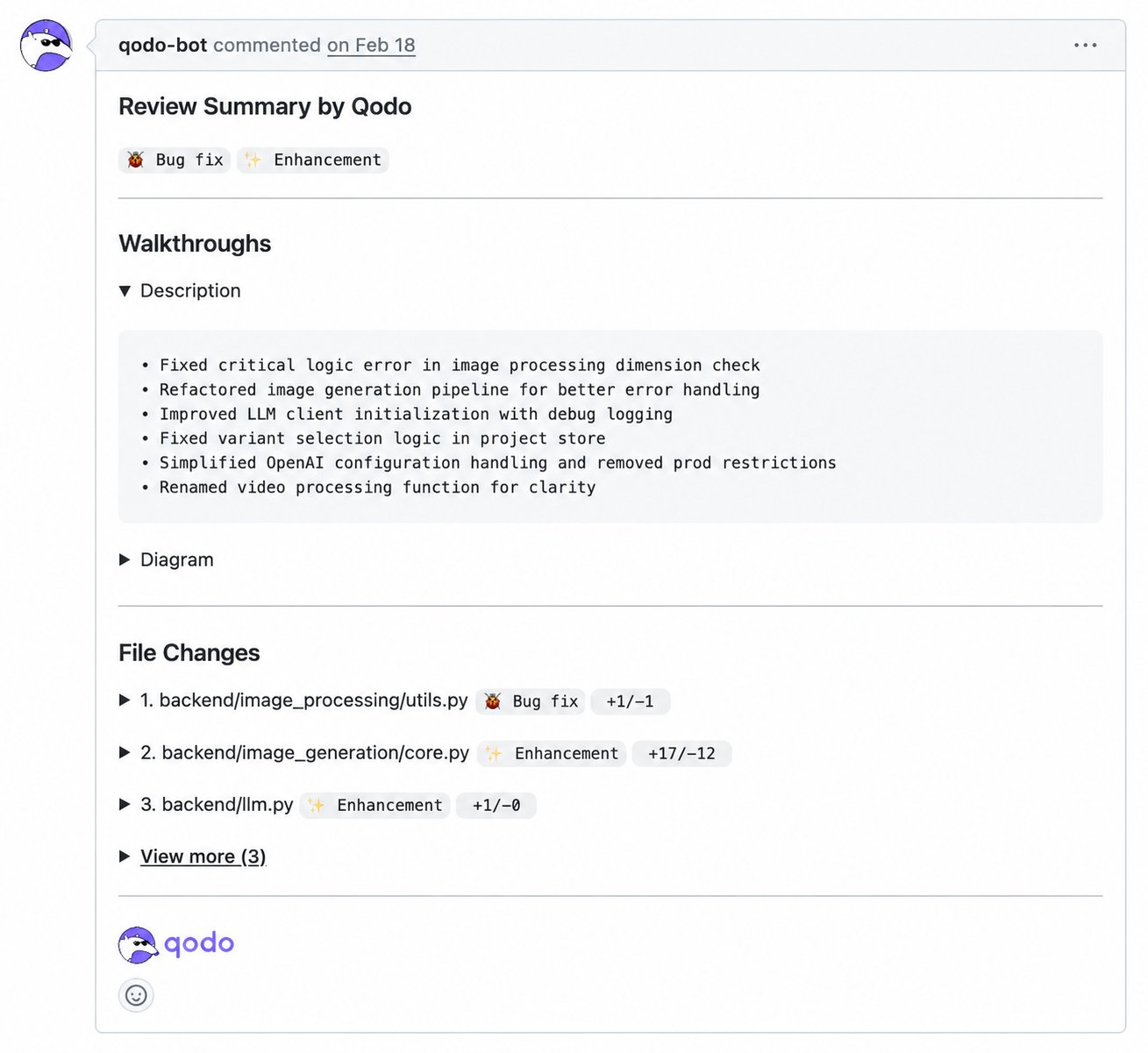 This includes the following sections:
Qodo adds an AI-generated summary of the pull request's intent and impact.
* By default, the summary is posted as a standalone comment and your original pull request description stays unchanged.
* You can also configure Qodo to merge the summary into the native pull request description.
This helps reviewers align quickly on the purpose of the pull request.
Qodo tags each pull request and estimates how long the review will take, so reviewers can prioritize before opening a single file. Tags include: Bug fix, Tests, Enhancement, Documentation, and Configuration changes.
Qodo breaks down the change in detail:
* **Description:** A plain-language breakdown of what changed and why.
* **Diagram:** An architecture diagram showing the flow and connections introduced by the change.
* **High-Level Assessment:** Suggestions and alternatives for the author and reviewer to consider before or during review.
Qodo provides a file-level overview of the pull request.
For each modified file, you can see:
* The file path
* The type of change (for example, Bug Fix or Enhancement)
* Lines added and removed
This helps reviewers understand the scope of the change set before examining individual findings.
## Code review findings overview
After providing context, Qodo presents a findings overview covering category counts, the context behind the review, and each finding's quality impact and severity.
This includes the following sections:
Qodo adds an AI-generated summary of the pull request's intent and impact.
* By default, the summary is posted as a standalone comment and your original pull request description stays unchanged.
* You can also configure Qodo to merge the summary into the native pull request description.
This helps reviewers align quickly on the purpose of the pull request.
Qodo tags each pull request and estimates how long the review will take, so reviewers can prioritize before opening a single file. Tags include: Bug fix, Tests, Enhancement, Documentation, and Configuration changes.
Qodo breaks down the change in detail:
* **Description:** A plain-language breakdown of what changed and why.
* **Diagram:** An architecture diagram showing the flow and connections introduced by the change.
* **High-Level Assessment:** Suggestions and alternatives for the author and reviewer to consider before or during review.
Qodo provides a file-level overview of the pull request.
For each modified file, you can see:
* The file path
* The type of change (for example, Bug Fix or Enhancement)
* Lines added and removed
This helps reviewers understand the scope of the change set before examining individual findings.
## Code review findings overview
After providing context, Qodo presents a findings overview covering category counts, the context behind the review, and each finding's quality impact and severity.
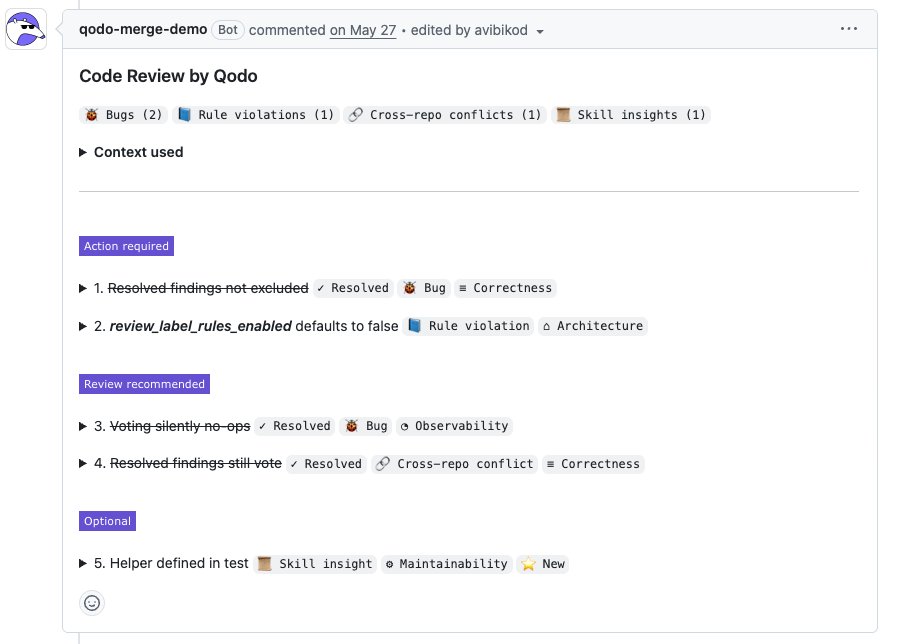 This includes the following sections:
Findings are grouped by category, with counts for each type.
| Category | What it means |
| --------------------------------------------------------------------------------------------- | --------------------------------------------------------------------------------------------------------------------------------------------------- |
| **🐞 Bugs** | Issues that may cause incorrect behavior or failures. |
| **📘 Rule violations** | Violations of organizational or repository rules. |
| **📎 Requirement gaps** | Missing or unmet business or ticket requirements. |
| **🔗 Cross-repo conflicts** Beta | Breaking changes detected across repository boundaries. See [Cross-repository code review](/governance/cross-repo-code-review). |
| **📜 Skill insights** Beta | Guidance or violations surfaced from a repository's skills. See [Manage skills across repositories](/governance/manage-skills-across-repositories). |
This overview gives you an immediate sense of the review's focus and severity.
When a review draws on additional context, such as [rules](/governance/rule-enforcement), [skills](/governance/manage-skills-across-repositories), or [cross-repo context](/governance/cross-repo-code-review), Qodo displays a **Context used** panel listing exactly what was applied.
This includes the following sections:
Findings are grouped by category, with counts for each type.
| Category | What it means |
| --------------------------------------------------------------------------------------------- | --------------------------------------------------------------------------------------------------------------------------------------------------- |
| **🐞 Bugs** | Issues that may cause incorrect behavior or failures. |
| **📘 Rule violations** | Violations of organizational or repository rules. |
| **📎 Requirement gaps** | Missing or unmet business or ticket requirements. |
| **🔗 Cross-repo conflicts** Beta | Breaking changes detected across repository boundaries. See [Cross-repository code review](/governance/cross-repo-code-review). |
| **📜 Skill insights** Beta | Guidance or violations surfaced from a repository's skills. See [Manage skills across repositories](/governance/manage-skills-across-repositories). |
This overview gives you an immediate sense of the review's focus and severity.
When a review draws on additional context, such as [rules](/governance/rule-enforcement), [skills](/governance/manage-skills-across-repositories), or [cross-repo context](/governance/cross-repo-code-review), Qodo displays a **Context used** panel listing exactly what was applied.
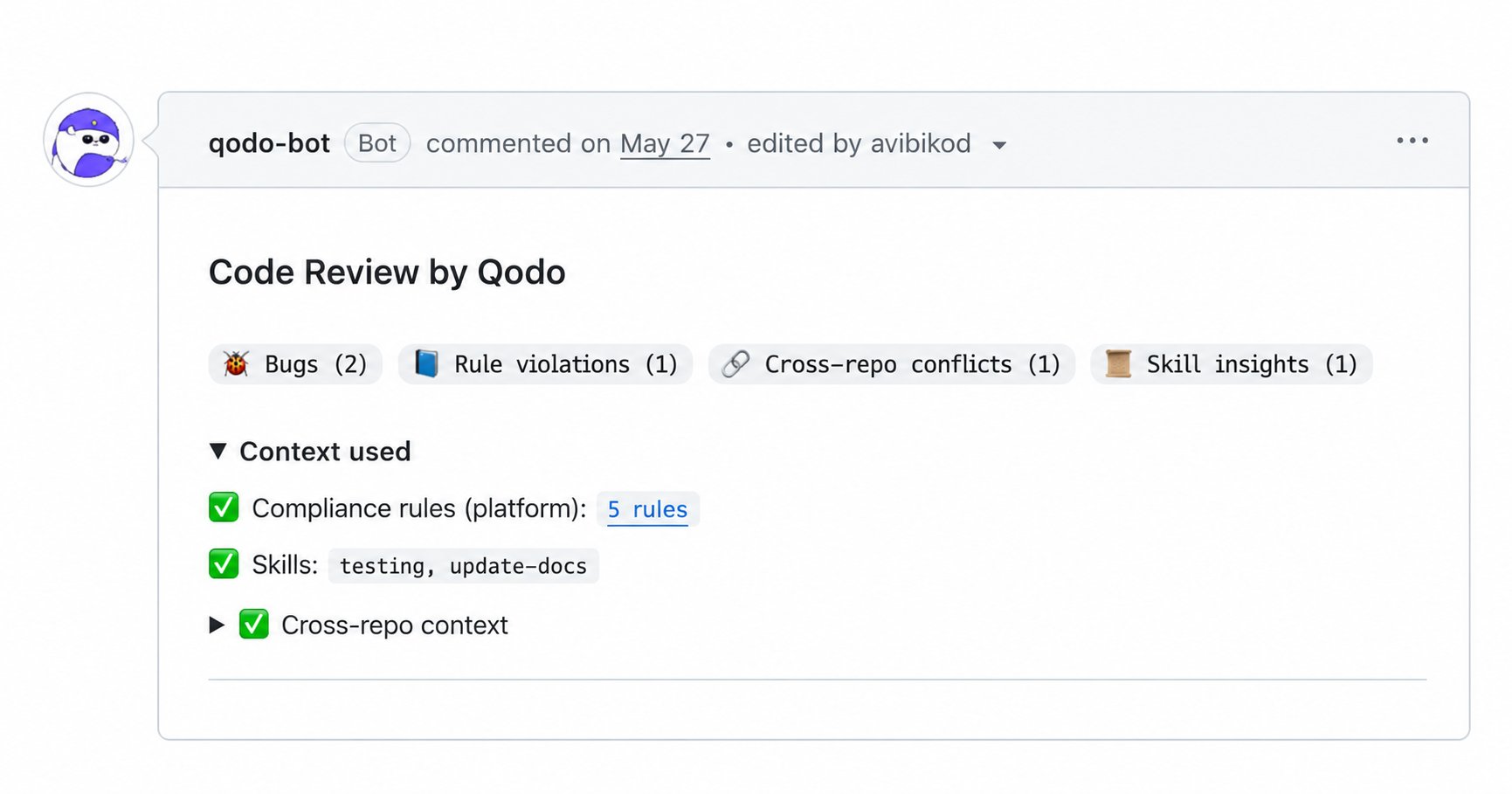 Disable the **Show context used** setting to exclude this section from the code review, for example if it adds noise for your own tooling that parses Qodo's PR comments. See [Configure Qodo using the portal](/install-and-configure/configuration-overview/portal-configuration#display-preferences).
In addition to categories, each finding includes a quality impact label. This label indicates which quality dimension is affected by the issue.
Common labels include:
| Label | What it means |
| ----------------- | --------------------------------------------------------------------- |
| **Correctness** | Issues that may cause incorrect behavior or wrong results. |
| **Security** | Issues that could expose vulnerabilities or sensitive data. |
| **Reliability** | Issues that may affect stability, error handling, or fault tolerance. |
| **Performance** | Issues that impact efficiency, latency, or resource usage. |
| **Observability** | Issues that affect logging, metrics, or system visibility. |
These labels provide quick semantic context, helping you understand *what kind of quality is impacted* before diving into the full issue details.
Disable the **Show context used** setting to exclude this section from the code review, for example if it adds noise for your own tooling that parses Qodo's PR comments. See [Configure Qodo using the portal](/install-and-configure/configuration-overview/portal-configuration#display-preferences).
In addition to categories, each finding includes a quality impact label. This label indicates which quality dimension is affected by the issue.
Common labels include:
| Label | What it means |
| ----------------- | --------------------------------------------------------------------- |
| **Correctness** | Issues that may cause incorrect behavior or wrong results. |
| **Security** | Issues that could expose vulnerabilities or sensitive data. |
| **Reliability** | Issues that may affect stability, error handling, or fault tolerance. |
| **Performance** | Issues that impact efficiency, latency, or resource usage. |
| **Observability** | Issues that affect logging, metrics, or system visibility. |
These labels provide quick semantic context, helping you understand *what kind of quality is impacted* before diving into the full issue details.
 Findings are grouped by priority, making it clear what needs attention first.
| Priority | What it means |
| ---------------------- | ----------------------------------------------------------------------------------------------------------------------------------------------------------------------------- |
| **Action Required** | High-priority or blocking issues that should be addressed before merging, such as security or compliance violations, sensitive data exposure, or critical correctness issues. |
| **Review Recommended** | Non-blocking issues that improve code quality, maintainability, or consistency with defined standards. |
| **Informational** | Lower-impact or informational findings that provide context or optional guidance. |
This prioritization helps you focus on what matters most without losing visibility into the full set of findings.
Findings are grouped by priority, making it clear what needs attention first.
| Priority | What it means |
| ---------------------- | ----------------------------------------------------------------------------------------------------------------------------------------------------------------------------- |
| **Action Required** | High-priority or blocking issues that should be addressed before merging, such as security or compliance violations, sensitive data exposure, or critical correctness issues. |
| **Review Recommended** | Non-blocking issues that improve code quality, maintainability, or consistency with defined standards. |
| **Informational** | Lower-impact or informational findings that provide context or optional guidance. |
This prioritization helps you focus on what matters most without losing visibility into the full set of findings.
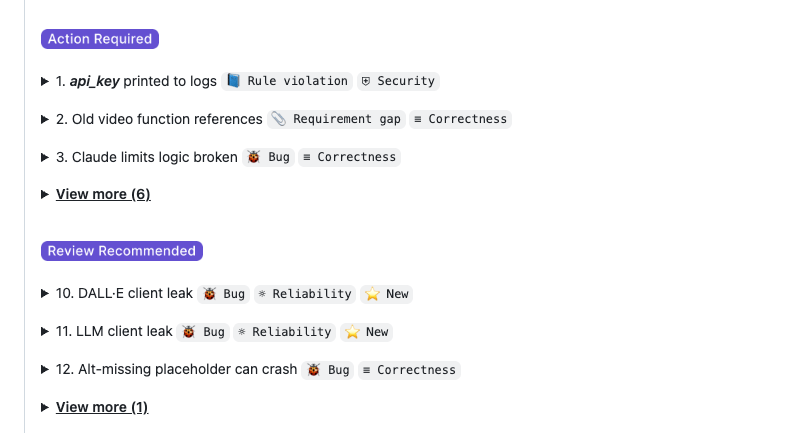 As you push new commits, resolved findings stay in this list with a strikethrough, so you can see what's been addressed without losing track of the full review.
## Unpack a code review finding
Each finding can be expanded to reveal full details. You can access findings:
* From the prioritized summary list
* Inline, directly in the **Files changed** view
Regardless of how you access it, each finding presents the same structured information.
Click each tab below to see the different elements of a finding:
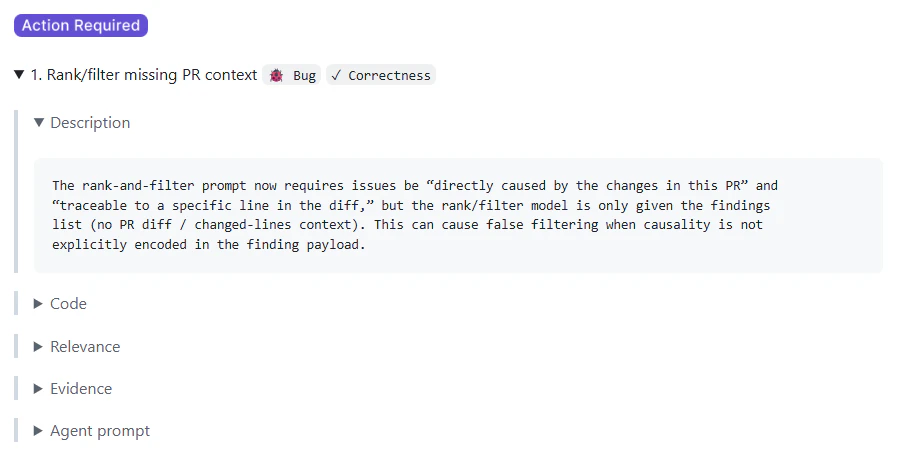
A clear, human-readable explanation of the issue and its potential impact.
As you push new commits, resolved findings stay in this list with a strikethrough, so you can see what's been addressed without losing track of the full review.
## Unpack a code review finding
Each finding can be expanded to reveal full details. You can access findings:
* From the prioritized summary list
* Inline, directly in the **Files changed** view
Regardless of how you access it, each finding presents the same structured information.
Click each tab below to see the different elements of a finding:
A clear, human-readable explanation of the issue and its potential impact.
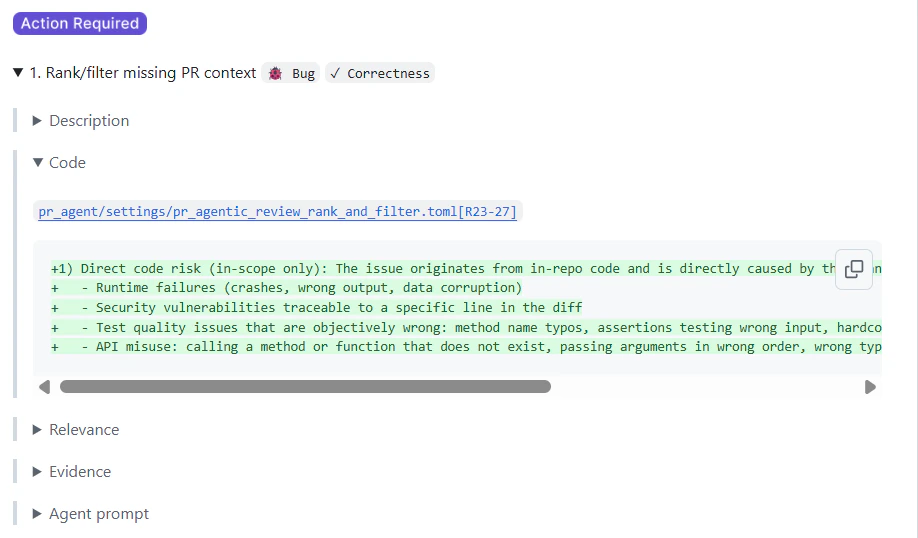
 * A snippet showing where the issue occurs
* Direct links to the relevant lines in the pull request
* A snippet showing where the issue occurs
* Direct links to the relevant lines in the pull request
Beta
GitHub
GitLab
Entries are generated automatically based on [PR history indexing](/core-concepts/pr-history).
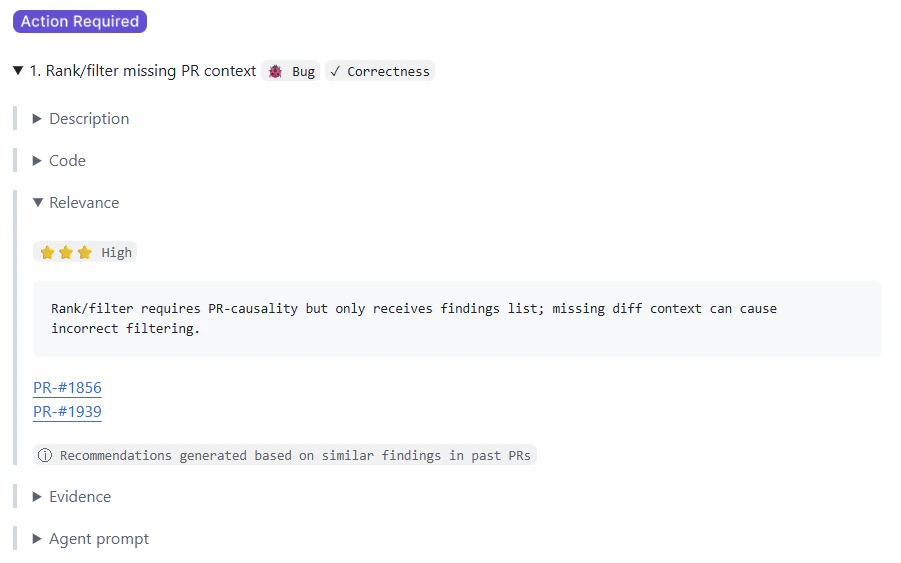
The **Relevance** section highlights related pull requests with similar findings from past reviews. This provides historical context by linking to previous pull requests where a similar issue was discussed, accepted, or rejected.
Each entry includes:
* A relevance classification indicating whether the finding has high, medium, or low relevance based on how similar findings were handled in past pull requests:
* ⭐⭐⭐ **High**: Similar findings were typically accepted/fixed.
* ⭐⭐ **Medium**: Mixed or inconclusive history.
* ⭐ **Low**: Similar findings were typically ignored.
* A brief explanation of the historical pattern
* Links to relevant past pull requests
* An indicator that the insight was generated from similar findings
 See [Relevance](/code-review/relevance) for more on how this classification works.
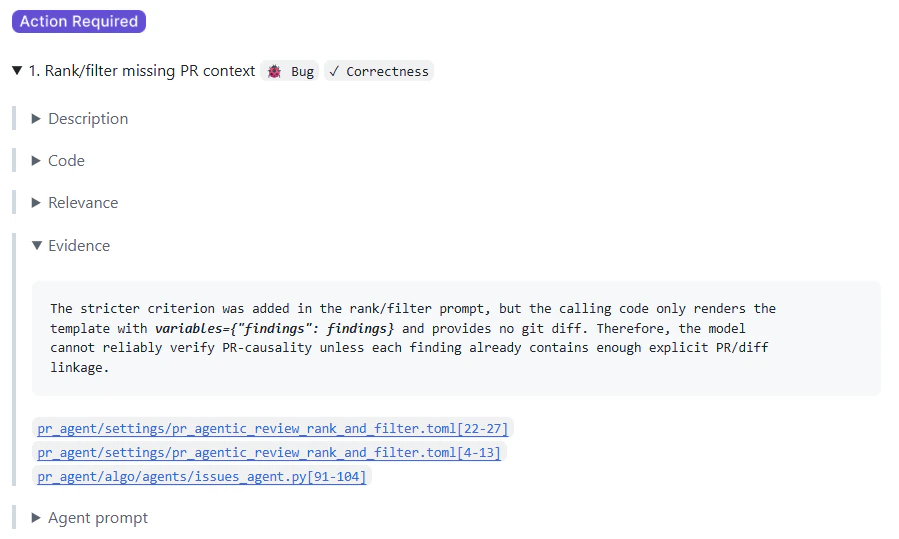
Context explaining *why* the issue was flagged, such as:
* The specific rule involved
* Linked requirements or tickets (when applicable)
This transparency makes it easier to trust and validate the feedback.
See [Relevance](/code-review/relevance) for more on how this classification works.
Context explaining *why* the issue was flagged, such as:
* The specific rule involved
* Linked requirements or tickets (when applicable)
This transparency makes it easier to trust and validate the feedback.
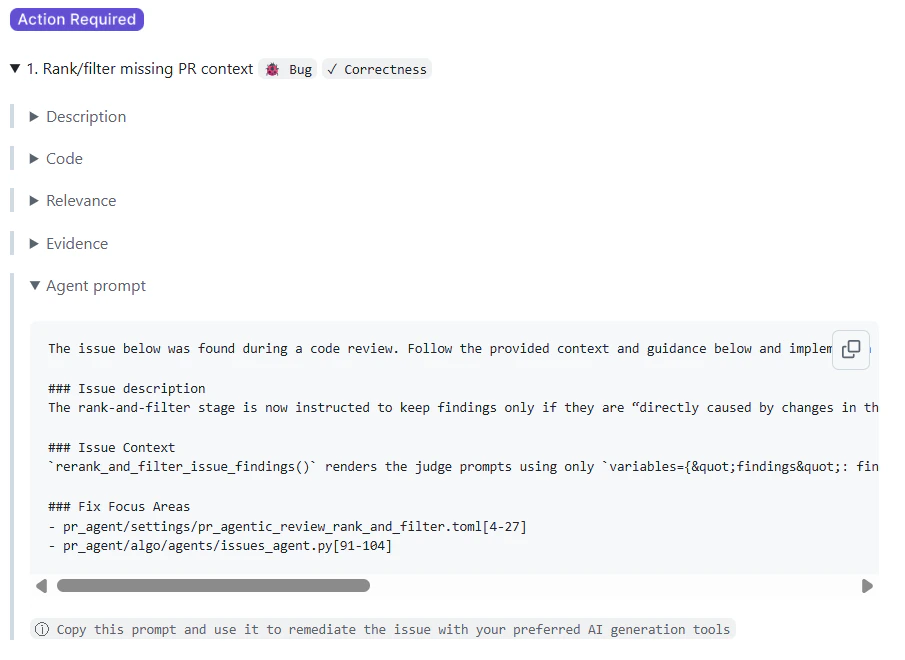
 For issues that can be fixed programmatically, Qodo provides an **agent prompt**. You can copy the prompt and use it in an AI coding tool to apply the suggested fix with full context, helping you move from feedback to resolution faster.
 GitHub
GitLab
For small, inline findings in a single file, Qodo attaches a commit-ready fix directly to the comment. You can apply it without switching to your local environment.
* Click **Apply Suggestion** to commit the fix immediately.
* Click **Add suggestion to batch** to group multiple fixes into a single commit.
See [Commit code fixes directly in the pull request](/code-review/commitable-code-suggestions).
Findings from all pull requests are also tracked centrally in the Qodo portal. See [Monitor organization-wide pull request findings](/governance/view-all-findings-in-organization) to filter and monitor findings across all repositories.
## Previous review results (formerly Audit trail)
Qodo keeps a collapsible **Previous review results** section in the comment, showing the history of past review runs on the pull request:
* Shows which commit the current review reflects.
* Each earlier commit has its own collapsible **Results up to commit** entry.
* Expanding an entry surfaces the full set of findings from that earlier review run.
This helps reviewers see how the review evolved as new commits were pushed.
GitHub
GitLab
For small, inline findings in a single file, Qodo attaches a commit-ready fix directly to the comment. You can apply it without switching to your local environment.
* Click **Apply Suggestion** to commit the fix immediately.
* Click **Add suggestion to batch** to group multiple fixes into a single commit.
See [Commit code fixes directly in the pull request](/code-review/commitable-code-suggestions).
Findings from all pull requests are also tracked centrally in the Qodo portal. See [Monitor organization-wide pull request findings](/governance/view-all-findings-in-organization) to filter and monitor findings across all repositories.
## Previous review results (formerly Audit trail)
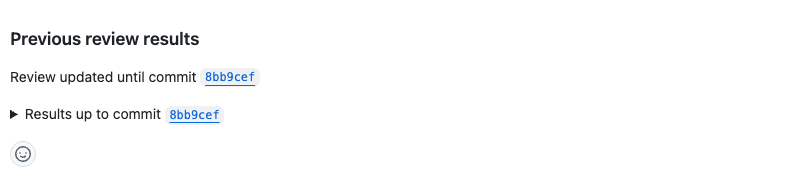
Qodo keeps a collapsible **Previous review results** section in the comment, showing the history of past review runs on the pull request:
* Shows which commit the current review reflects.
* Each earlier commit has its own collapsible **Results up to commit** entry.
* Expanding an entry surfaces the full set of findings from that earlier review run.
This helps reviewers see how the review evolved as new commits were pushed.
 ## Related resources
* [Relevance](/code-review/relevance): See how Qodo classifies a finding's relevance based on past pull requests.
* [Configure Qodo using the portal](/install-and-configure/configuration-overview/portal-configuration): Set findings visibility, severity thresholds, and verbosity from one place.
* [Rule enforcement](/governance/rule-enforcement): Learn how rules are created and enforced.
* [Persistent review comments](/code-review/persistent-review-comments): Configure how the Previous review results section updates across commits.
## Related resources
* [Relevance](/code-review/relevance): See how Qodo classifies a finding's relevance based on past pull requests.
* [Configure Qodo using the portal](/install-and-configure/configuration-overview/portal-configuration): Set findings visibility, severity thresholds, and verbosity from one place.
* [Rule enforcement](/governance/rule-enforcement): Learn how rules are created and enforced.
* [Persistent review comments](/code-review/persistent-review-comments): Configure how the Previous review results section updates across commits.